An AI chatbot for Slack and Teams answers work questions in the place where work already happens. Someone asks in a channel, and a grounded answer comes back with sources attached. That small shift matters more than it sounds. Internal knowledge tools usually fail for one dull reason: nobody opens them. Chat, on the other hand, stays open all day.
So the useful question is no longer whether chat is the right surface. Instead, it is whether your bot respects permissions, cites its sources, and still earns its keep in week twelve. This guide covers all three. It also covers where Slack and Teams genuinely differ, because they do differ, and that difference shapes your rollout.
Why chat is where enterprise answers belong
Every company already runs a knowledge base. Very few employees read it. The gap is rarely about content quality. Rather, it is about the cost of switching context. Opening a wiki, guessing the right search term, and scanning six pages takes minutes. Asking a colleague takes seconds, so people ask the colleague.
An AI chatbot for Slack and Teams removes that cost. Because the assistant sits in the same window as the question, retrieval becomes conversational. Moreover, the answer arrives in a thread that other people can read later, which turns one answer into shared context.
There is a second benefit that leaders notice quickly. Chat produces a clean record of what people actually ask. Consequently, you learn where documentation is missing, rather than guessing. We covered that feedback loop in our guide to turning documentation into reliable answers.
What an AI chatbot for Slack and Teams actually does
Vendors describe this category loosely, so it helps to be concrete. A production assistant in chat performs five jobs.
- Answers questions from your own content. Policies, runbooks, product docs, tickets and drive files.
- Enforces permissions at query time. Two people asking the same question can, and often should, get different answers.
- Cites every claim. Each answer links back to the document and section it came from.
- Escalates cleanly. When confidence is low, it hands the thread to a human with context attached.
- Reports gaps. Unanswered questions become documentation tasks instead of silent failures.
Notice what is missing from that list. Nothing here depends on a bigger model. In practice, teams that chase model upgrades before fixing retrieval end up with a faster way to be wrong. Our due-diligence checklist for enterprise chatbot platforms goes deeper on that trap.
The permission problem nobody demos
Demos use a clean corpus, so permissions never come up. Real deployments are messier. Salary bands live in one drive folder. Board material sits in another. Meanwhile, a support macro references a customer contract that most staff may not read.
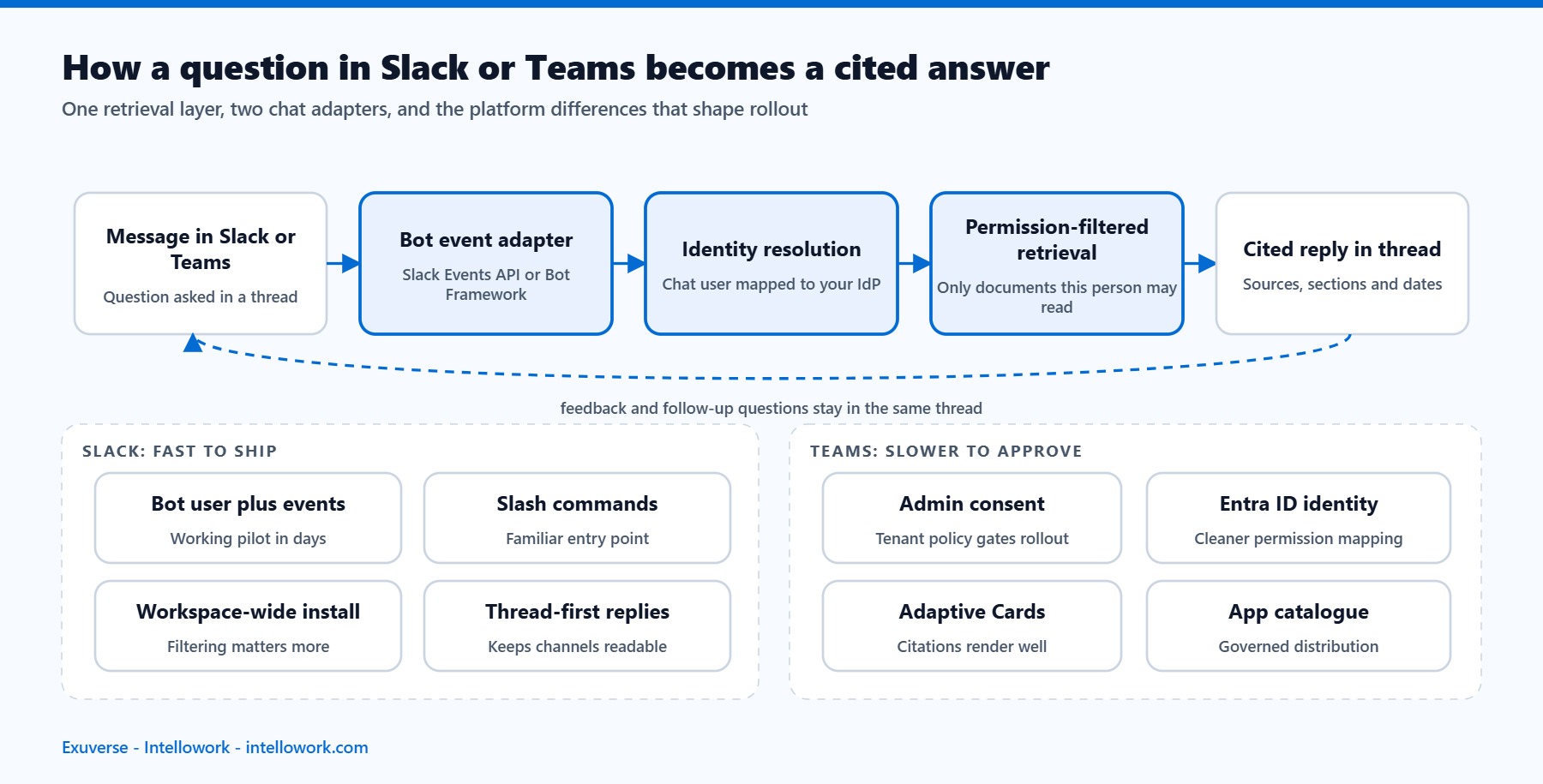
Therefore the assistant needs three things. First, identity mapping, so a Slack or Teams user resolves to the same person your identity provider knows. Second, access-control capture at ingest, so every chunk carries its allow list. Third, filtering at query time, so retrieval never sees a document the asker may not open.
Nightly permission copies are the common shortcut. Unfortunately they drift. Someone leaves a project on Monday and still gets answers from it on Tuesday. If a vendor cannot explain how quickly revocation propagates, treat that as a finding rather than a detail. We unpack the mechanics in our post on role-based access in AI chatbots.
Slack and Teams look similar, yet they behave differently
Both platforms host bots, and both support threads, so an AI chatbot for Slack and Teams can look identical from the outside. Still, the engineering details diverge enough to affect your timeline. Plan for each surface separately.
Slack: fast to ship, easy to over-notify
Slack rewards speed. A bot user, an events subscription and a slash command get you working in days. The Slack platform documentation covers the surfaces well. Threads keep channels tidy, so answer in-thread by default.
Watch two things. First, workspace-level installs give the bot broad reach, which makes permission filtering more important, not less. Second, channel noise kills adoption quickly. Consequently, most teams start with an app-home experience and two or three opt-in channels.
Teams: slower to approve, stronger once approved
Teams sits inside Microsoft 365, so governance arrives earlier. Admin consent, app catalogue policies and tenant restrictions all apply. The Teams developer documentation lays out the manifest and approval path.
That friction pays off later. Because identity already flows through Entra ID, mapping users to source permissions gets simpler. Adaptive Cards also render citations nicely, which helps trust. Overall, expect a longer approval cycle and a smoother rollout afterwards.
One brain, two front doors
Whatever you build, keep the retrieval layer shared. Otherwise you maintain two answer qualities, two evaluation sets and two sets of complaints. An AI chatbot for Slack and Teams should differ only at the adapter, never at the index.
The architecture behind an AI chatbot for Slack and Teams
The moving parts inside an AI chatbot for Slack and Teams are stable across vendors, so you can evaluate them independently. Connectors pull content from source systems on an incremental schedule. A chunker splits documents while preserving headings, tables and code. An embedding model turns those chunks into vectors, and a keyword index keeps exact terms searchable.
At query time, hybrid retrieval runs both searches and merges the results. A reranker then promotes the passages that truly answer the question. Finally, the model writes an answer using only those passages, and the adapter posts it back into the thread.
Two components decide perceived quality. Reranking fixes the classic complaint that the bot found the right document but the wrong paragraph. Meanwhile, verification catches sentences that no retrieved span supports. Our internal knowledge base chatbot architecture walks through each layer with the failure modes attached.
A 30-day rollout plan for an AI chatbot for Slack and Teams
Big-bang launches of an AI chatbot for Slack and Teams tend to disappoint, mostly because expectations outrun retrieval quality. A staged plan works better.
- Days 1 to 5. Pick one domain, such as IT helpdesk or HR policy. Connect two sources, not ten.
- Days 6 to 12. Write 60 real questions with known answers. This becomes your regression set.
- Days 13 to 18. Tune chunking and reranking against that set. Fix retrieval before touching prompts.
- Days 19 to 24. Pilot with one team in a single channel. Watch escalations, not vanity usage.
- Days 25 to 30. Add the second platform, publish an accuracy report, then widen access.
Notice that the model choice never appears. That is deliberate. Once retrieval is solid, swapping models becomes a tuning decision rather than a rescue mission.
Metrics that show an AI chatbot for Slack and Teams is working
Message volume flatters everyone and proves nothing. Track outcomes instead.
- Answer rate. Share of questions resolved without a human reply in the thread.
- Citation accuracy. Sampled answers where the cited span genuinely supports the claim.
- Escalation quality. Whether handoffs carry enough context to save the responder time.
- Time to answer. Median seconds from question to useful reply, compared with the old path.
- Coverage gaps. Questions the corpus cannot answer, grouped by theme.
Review these weekly for the first quarter. After that, monthly is enough. Also keep a small human review queue, because automated scores drift when your content changes. Our guide to LLM observability for internal AI assistants covers the tooling side.
Common mistakes when rolling out an AI chatbot for Slack and Teams
Three patterns come up repeatedly in reviews. First, teams connect every source on day one, which floods retrieval with duplicates and stale drafts. Start narrow instead, then expand once precision holds.
Second, some teams disable citations to make answers look cleaner. Trust collapses within a fortnight. People need a way to check, especially for policy questions.
Third, many pilots skip the escape hatch. An assistant that never says “I could not find this in your documents” will invent something eventually. A clear refusal is a feature, and users respect it once they see it working.
Fourth, teams often forget that content decays. Policies change, products ship, and yesterday’s runbook becomes tomorrow’s wrong answer. So schedule re-sync and re-embedding as a routine job, and show a “last updated” date beside each citation. Readers forgive an old document when they can see its age. They do not forgive a confident answer from a retired policy.
A fifth mistake is subtler. Some teams measure success only in the first month, when curiosity inflates every number. Instead, set the real baseline in month three. By then the novelty has gone, and whatever usage remains reflects genuine value.
Security questions to settle before an AI chatbot for Slack and Teams goes live
Security review of an AI chatbot for Slack and Teams often arrives late and then stalls the launch. Settle five questions in week one instead.
- Where does the data sit? Name the region for the index, the logs and the model endpoint.
- Who can read the traces? Prompts and retrieved passages contain business content, so treat trace access as production access.
- How long is anything retained? Set a retention window for conversations and traces, then enforce it.
- Is your content used for training? Get a written no, covering both the vendor and the model provider.
- What happens on offboarding? A departing employee should lose chat answers the moment the identity provider says so.
Indian deployments add a further layer. The Digital Personal Data Protection Act shapes retention, purpose limitation and cross-border transfer. European rollouts bring GDPR and, for some use cases, the EU AI Act. We covered the practical mapping in enterprise AI chatbot security and compliance.
One practical tip helps enormously. Write a one-page data-flow note before procurement asks for it. Because the note answers most questionnaire items directly, review cycles shrink from weeks to days.
Design the conversation, not only the answer
Retrieval quality gets the attention, yet conversation design decides whether people come back. A few habits separate assistants that stick from those that fade.
Answer in threads, never in the main channel. Otherwise the channel becomes unreadable and members mute it. Keep answers short by default, and offer a “show more” expansion for detail.
Ask one clarifying question when a query is ambiguous, but only one. Two questions feel like an interrogation, and people give up. When the assistant is unsure, say so plainly and offer the closest documents instead of guessing.
Finally, put a feedback control on every answer. Thumbs are enough. Those signals become your review queue, and they surface content problems long before anyone files a ticket. A well-designed AI chatbot for Slack and Teams treats feedback as a first-class input, not a decoration.
Where Intellowork fits
Intellowork is our enterprise assistant, built for exactly this pattern. It runs one AI chatbot for Slack and Teams on the same retrieval layer that powers the web widget, WhatsApp and support inboxes. Source permissions are enforced at retrieval time, so answers respect the access each person already has.
Every answer carries citations down to the section level. Hosting runs in ap-south-1 by default, with EU and US regions on request, which keeps data residency conversations short. Teams typically reach a useful pilot in two to three weeks, mainly because connectors and evaluation tooling come with the platform.
If you would rather build it in house, that is a reasonable choice under some conditions. We set them out honestly in build versus buy for an enterprise AI chatbot.
Beyond the helpdesk: where chat assistants earn their second year
Most programmes start with IT or HR questions, and that is a sensible beginning. However, the durable value usually shows up elsewhere, once retrieval quality is proven.
Sales teams use it for competitive answers during live calls. Because the reply arrives in the deal channel, the whole team sees the same version. Support teams use it to draft first responses from past tickets and product docs, which shortens handling time without removing the human.
Engineering teams use it for runbooks and incident history. During an incident, the question “have we seen this before” is worth answering in seconds. Finance and legal teams use it for policy lookups, where citations matter more than fluency.
Each of these adds a new source, and each new source stresses permissions differently. Therefore, expand deliberately. Connect one system, measure precision for a fortnight, then decide. An AI chatbot for Slack and Teams grows well when the corpus grows slowly and the evaluation set grows with it.
One more pattern deserves a mention. Some organisations run the assistant in a private channel for a specific project, scoped to that project’s documents. Consequently, answers stay sharp, and the group gets a shared memory that outlives the project. We explored the wider pattern in company internal chatbot solutions.
Frequently asked questions
How long does it take to deploy an AI chatbot for Slack and Teams?
Slack usually takes days to reach a working pilot. Teams takes longer, mostly because tenant approval and app catalogue policies sit in the path. A realistic combined timeline is two to four weeks for a single, well-scoped domain.
Will an AI chatbot for Slack and Teams expose confidential documents?
Not if permissions are enforced at query time. The assistant should map the chat identity to your identity provider, then filter retrieval by the access lists captured at ingest. Ask any vendor how quickly a revoked permission takes effect, and test it yourself.
Can one assistant serve both platforms?
Yes, and it should. Keep a single retrieval layer and a single evaluation set, then use thin adapters for each surface. Otherwise answer quality diverges and maintenance doubles.
Does this replace the company wiki?
No, it changes how people reach it. The wiki stays the source of truth, while chat becomes the interface. In fact, good assistants improve the wiki, because gap reports show exactly which pages are missing or outdated.
What does an AI chatbot for Slack and Teams cost?
Costs split into build and run. Build covers connectors, retrieval tuning and channel work. Run covers model tokens, index hosting and content refresh. Our breakdown of AI chatbot development cost in India lists the line items buyers usually miss.
The takeaway
Chat is the right surface because it is already open. Even so, the surface is the easy part. Permissions, retrieval quality and citations decide whether people keep asking after the novelty fades.
Start with one domain and two sources. Build a regression set before you build a prompt. Ship to Slack first if you want speed, or to Teams first if governance is your gate. Then measure answer rate and citation accuracy every week, and let those numbers guide what you connect next.
If you want to see this running on your own content, Intellowork can be pointed at a small corpus and evaluated in a fortnight.
About the author
Tarun Gupta is the founder and AI architect at Exuverse Private Limited, an AI and custom software development company in Noida, India. He designs and operates production retrieval-augmented generation systems on AWS Bedrock, Solr and pgvector, and he is the architect behind Intellowork.
Last reviewed: 1 September 2026.
Read next: AI onboarding assistant: getting new hires productive in week one
Read next: The same assistant can answer HR questions in those channels. See our guide to the HR policy chatbot, or the voice AI agent for calls.