An AI onboarding assistant answers the hundreds of small questions a new hire is afraid to ask twice. Where is the deployment runbook? Who approves this expense? Which Slack channel handles production incidents? Those questions are trivial for anyone with two years of tenure, and they are genuinely hard for someone on day three. This guide explains how an AI onboarding assistant works, what it should be allowed to see, how to measure it honestly, and how to roll one out in ninety days without creating a new source of wrong answers.
The short answer
An AI onboarding assistant is a permission-aware chat interface sitting on top of your existing internal content: the wiki, the HR policies, the code documentation, the ticketing history and the shared drives. It retrieves the relevant passages, answers in plain language, and cites the source document so the new hire can verify it. Done properly, it cuts the “where do I find” questions sharply in the first month. Done carelessly, it leaks salary bands to interns, so access control matters more than the model does.
Why onboarding stalls, in numbers
Overall, the research is consistent and slightly uncomfortable. New hires take roughly six to seven months to feel genuinely settled in a role. Meanwhile, 86 per cent of them decide how long they will stay within the first six months, and around 22 per cent of workers leave inside the first ninety days. HR leaders commonly put the cost of a failed new hire at up to $25,000.
Manager attention is the strongest single lever. Gallup found that new hires are 3.4 times more likely to rate their onboarding as exceptional when their manager takes an active part. However, managers are also the people with the least free time, which is exactly the tension an assistant can relieve.
Here is the useful way to frame it. An AI onboarding assistant does not replace the manager conversation. It removes the low-value interruptions around it, so the manager time that does happen goes into context, judgement and feedback rather than into repeating the VPN instructions.
| Onboarding signal | Reported figure | Why it matters |
|---|---|---|
| Time to feel settled | 6–7 months | Ramp is slower than most plans assume |
| Decide tenure early | 86% within six months | The first weeks set retention |
| Leave within 90 days | About 22% | Early friction is expensive |
| Manager participation effect | 3.4x better ratings | Protect manager time for real coaching |
| Cost of a failed hire | Up to $25,000 | Small ramp gains pay back quickly |
What an AI onboarding assistant actually does
In practice, think of it as four jobs rather than one. Each job draws on different content, and each one fails in a different way if you get the sourcing wrong.
| Job | Typical question | Source of truth |
|---|---|---|
| Policy lookup | “How much notice do I give for leave?” | HR handbook, leave policy |
| Process navigation | “Who approves a vendor invoice?” | Finance SOPs, approval matrix |
| Technical orientation | “How do I run the staging environment?” | Engineering wiki, README files |
| People and ownership | “Who owns the billing service?” | Org chart, service catalogue |
Notice that only the first job looks like classic HR. The other three are where most of the lost hours actually sit, and they are the ones a generic HR chatbot cannot answer at all, because it has never been shown the engineering wiki.
How an AI onboarding assistant works under the hood
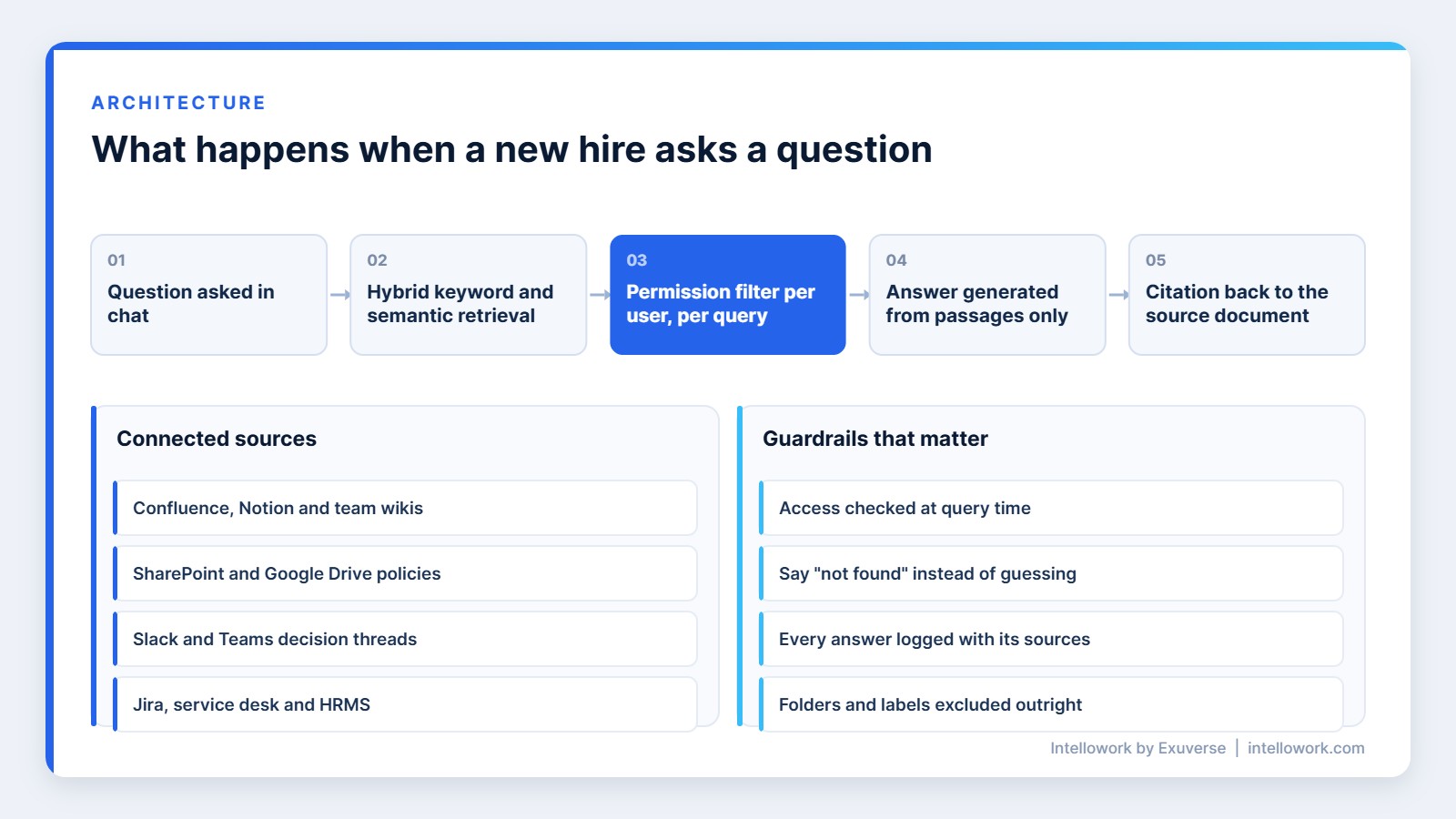
Fortunately, the architecture is less mysterious than the marketing suggests. Five steps run on every question, and each one is worth understanding before you buy.
- Ingestion. Documents are pulled from connected systems, split into passages and indexed, with their permissions carried along.
- Retrieval. The question is matched against that index using both keyword and semantic search, so exact policy names and vague phrasing both work.
- Filtering. Results the person is not allowed to see are removed before anything reaches the model. This step is the whole ballgame.
- Generation. The model writes an answer using only the retrieved passages, and it is instructed to say when it does not know.
- Citation. Every claim links back to the source document and section, so the new hire can check and learn where things live.
That last step does something subtle. Citations turn the assistant into a map of the company rather than an oracle. After a few weeks, people start going straight to the documents, which is exactly the outcome you want.
Permissions are the hard part, not the model
Sooner or later, every serious deployment runs into the same wall. Your content already has permissions, and they are messy. A folder shared “with everyone in the company” in 2021 now contains a compensation review. So if the assistant simply indexes everything, it will cheerfully surface it.
The fix is to enforce access at query time, not at index time. In other words, the system should check the asking person’s identity against the source system’s own permissions for every retrieved passage, on every question. Group membership changes, people move teams, and a nightly snapshot will always be slightly wrong.
Therefore, ask any vendor three specific questions. Does retrieval respect source-system permissions per user, per query? Are answers logged with the documents used? Can you exclude a folder, a label or a document type outright? If those answers are vague, the pilot will end badly. We covered the mechanics in more depth in our guide to role-based access in AI chatbots.
Where the content comes from
An AI onboarding assistant is only as good as the systems it can read. Most companies need four or five connectors, not twenty.
| System | What it contributes | Common gotcha |
|---|---|---|
| Confluence / Notion | Wiki, runbooks, team pages | Stale pages outrank current ones |
| SharePoint / Google Drive | Policies, templates, decks | Duplicate versions of the same file |
| Slack / Teams | Tribal knowledge, decisions | Opinions read as policy |
| Jira / service desk | How work actually flows | Ticket noise without curation |
| HRMS | Leave, payroll and policy documents | Highly sensitive, needs tight scoping |
For that reason, start with two sources rather than five. The wiki plus the policy drive covers most first-month questions, and a narrow launch makes quality problems obvious instead of hiding them in volume.
Content hygiene beats model choice
Frequently, teams blame the model when the assistant gives a stale answer. Usually the model is fine and the content is not. Three documents describe the same expense process, two of them are from 2023, and none is marked as current.
So before launch, do a short cleanup pass. Mark one canonical page per topic. Archive superseded versions rather than leaving them searchable. Add a visible owner and a review date to every policy page. This work is unglamorous, and it improves answer quality more than switching models ever will.
Afterwards, keep the loop running. Route every “this answer was wrong” flag to the document owner, not to the AI team. That way the assistant slowly improves your documentation instead of papering over it.
Measuring an AI onboarding assistant honestly
Unfortunately, usage alone proves nothing, because curiosity spikes in week one and then fades. Track outcomes instead.
| Metric | How to capture it | What good looks like |
|---|---|---|
| Self-serve resolution | Answered without a follow-up human ping | Rising past 60% by month three |
| Time to first meaningful contribution | Days to first merged change or owned task | Shorter than your previous cohort |
| Repeat questions to managers | Sampled manager survey each month | Falling steadily |
| Answer accuracy | Weekly review of 30 sampled answers | Above 90%, with citations checked |
| Coverage gaps | Questions with no confident answer | Becomes your documentation backlog |
The last row is the quiet win. Unanswered questions tell you precisely which parts of your company are undocumented, and that list is worth having even if you switch tools later.
Build or buy an AI onboarding assistant
Admittedly, most engineering teams can build a working prototype in a fortnight. The prototype is not the hard part, though. The hard part is everything that comes after the demo.
| Consideration | Building it yourself | Buying a platform |
|---|---|---|
| First working demo | Two to three weeks | Days |
| Permission enforcement | You build and maintain it per connector | Expected as standard |
| Connectors | Each one is a small project | Maintained for you |
| Evaluation tooling | Usually skipped, then regretted | Should be included |
| Ongoing cost | At least one engineer, permanently | Subscription plus content owners |
The honest rule of thumb is this. Build if retrieval quality is your competitive advantage, which is rare. Otherwise buy, and spend the engineering time on your product instead. Either way, budget for content ownership, because no platform can fix a wiki nobody maintains.
What an AI onboarding assistant costs
In most cases, pricing combines a platform fee with a per-user or per-query component, so the total depends on how many people ask how often.
For a company of 200 employees with three connected sources, expect a pilot in the low thousands of dollars and an annual cost that lands somewhere between the price of one junior hire and one mid-level hire. Compare that against the cost of failed hires, which HR leaders put at up to $25,000 each, and the payback maths is usually straightforward.
Watch two hidden costs. First, content cleanup takes real hours from real people in the first quarter. Second, evaluation is ongoing, not a one-time task, so someone needs thirty minutes a week to review sampled answers. Plan for both and the numbers hold.
A ninety-day rollout plan
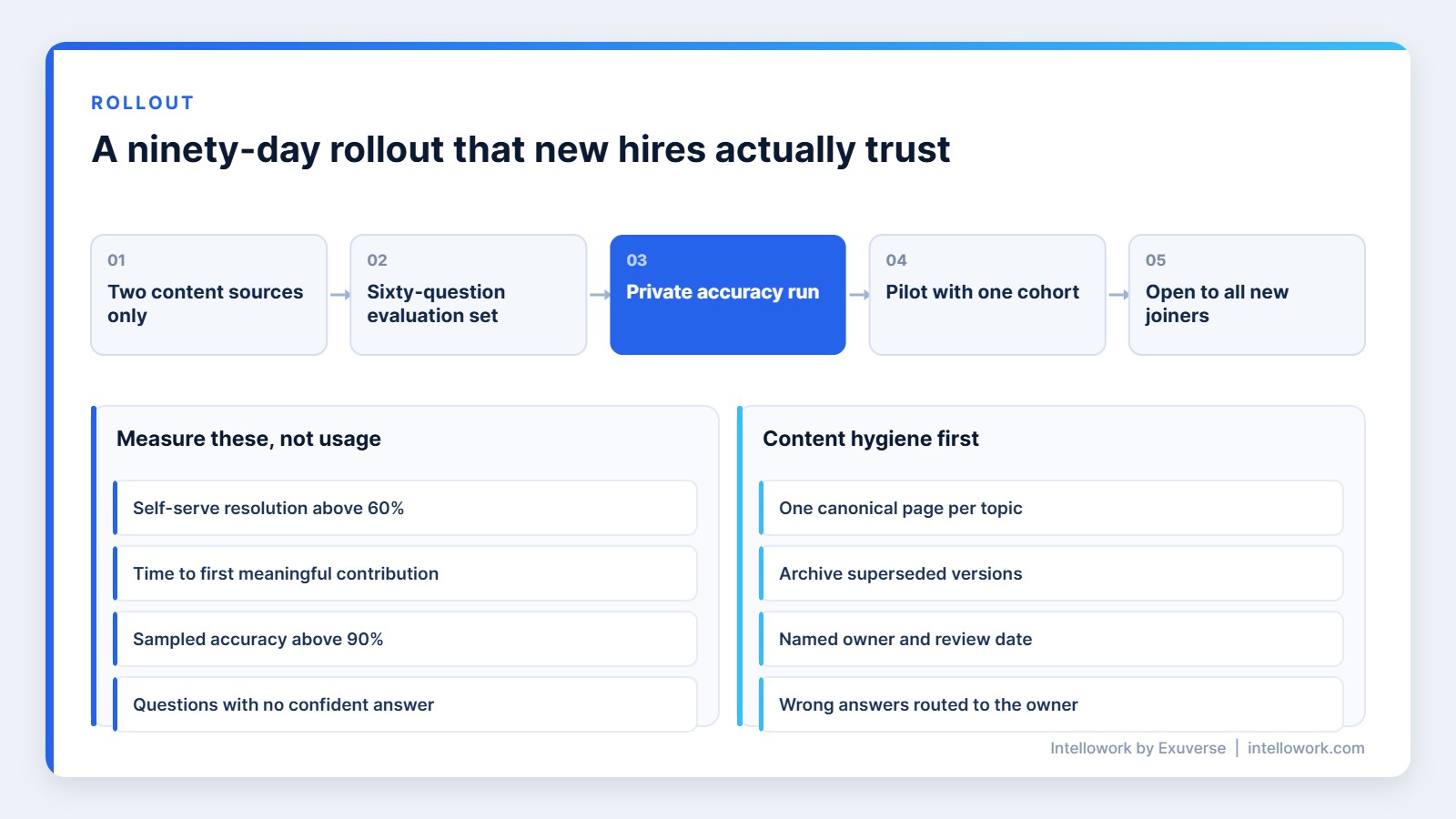
Generally, slow launches beat big ones here, mainly because trust is hard to rebuild once someone gets a confidently wrong answer.
- Days 1–15: pick two content sources, define who may see what, and assemble a 60-question test set from real onboarding threads.
- Days 16–30: run the assistant against that test set privately. Fix content, not prompts, wherever answers fail.
- Days 31–50: pilot with one incoming cohort plus their buddies. Collect every flagged answer.
- Days 51–70: add the third source, publish citation guidelines, and brief managers on what the assistant will and will not cover.
- Days 71–90: open it to all new joiners, and review the coverage-gap list with document owners.
What to avoid
A few patterns reliably sink these projects. Avoid launching without an evaluation set, because you will have no way to prove the assistant improved. Similarly, indexing everything on day one is a mistake, since permissions problems scale faster than value does. Finally, never hide the sources, because an answer without a citation is just a rumour with better grammar.
Also, resist the urge to make it sound human. New hires trust a tool that says “I could not find a current policy on this” far more than one that invents a plausible paragraph. We wrote about that trade-off in our piece on why citations matter in enterprise AI answers.
Beyond questions: nudges that actually help
Of course, answering is only the baseline. The bigger gain comes from the assistant knowing where a new joiner is in their first month and offering the next useful thing before they ask for it.
On day one that might be the laptop setup guide and the two Slack channels their team actually uses. In week two it might be the service they are about to work on, with its runbook and its current owner. By week four it can surface the review process, the release calendar and the escalation path, because those are the things people bump into at that point.
Even so, keep the nudges few and specific. Three well-timed prompts feel helpful, whereas a daily digest feels like homework and gets muted within a week. Track which nudges get opened, and delete the ones that do not.
One more design choice pays off quickly. Let people ask the same question in different words without penalty, and never make them learn a command syntax. New hires are already learning a hundred new things, so the assistant should be the one part of the week that asks nothing of them.
Finally, give managers a simple view of what their new joiner asked about most. Not the questions themselves, which would feel like surveillance, but the topics. A manager who can see that their new engineer spent three days circling the deployment process knows exactly what to cover in the next one-to-one, and that is the point of the whole exercise.
Intellowork as your AI onboarding assistant
Intellowork is our enterprise AI assistant, built for exactly this problem. It connects to the systems your knowledge already lives in, enforces permissions per user on every query, cites the source of every answer, and reports the questions it could not answer so your documentation improves week by week.
It also handles the boring realities of Indian workplaces: Hindi and Hinglish questions, WhatsApp as a channel for staff who do not sit at a desk, and DPDP-aware handling of personal data. You can read more about the underlying design in our notes on internal knowledge base architecture and on HR policy chatbots.
If you want to see whether an AI onboarding assistant fits your organisation, the fastest test is a small one. Give us two content sources and sixty real questions, and you will know inside a fortnight. Visit intellowork.com to start that conversation.
Frequently Asked Questions
What is an AI onboarding assistant?
Simply put, it is a chat-based assistant that answers a new employee’s questions using your company’s own documents. It retrieves passages from connected systems, respects each person’s access rights, and cites the source of every answer so the new hire can verify it and learn where information lives.
How is it different from an HR chatbot?
By comparison, an HR chatbot covers policy questions from a single handbook. An AI onboarding assistant also covers engineering documentation, finance approvals, service ownership and tribal knowledge in chat threads, which is where most first-month confusion actually sits.
Will it expose confidential documents?
Not if permissions are enforced per user at query time, so ask for proof. Ask the vendor to demonstrate two accounts with different access asking the same question and receiving different answers. If that demo is not offered, treat it as a red flag.
How long does it take to deploy?
Typically, a focused pilot takes four to six weeks with two content sources, and a full rollout usually completes within ninety days. Most of that time goes into content cleanup and evaluation rather than into installation.
How do we measure whether it works?
Above all, track self-serve resolution rate, time to a new hire’s first meaningful contribution, sampled answer accuracy with citations checked, and the list of questions the assistant could not answer. Usage counts alone will mislead you.
Does it work for non-English questions?
Yes, provided the platform supports it. For Indian teams, Hindi and Hinglish questions against English documentation are common, so ask for a live demonstration in mixed language rather than accepting a claim on a feature list.
About the author
Tarun Gupta is the founder of Exuverse Private Limited in Sector 140A, Noida. He builds and operates enterprise AI systems, including Intellowork and ProtectComply, and works hands-on with AWS Bedrock, retrieval architectures and Next.js. Reach the team at info@exuverse.com or +91 97739 62121.