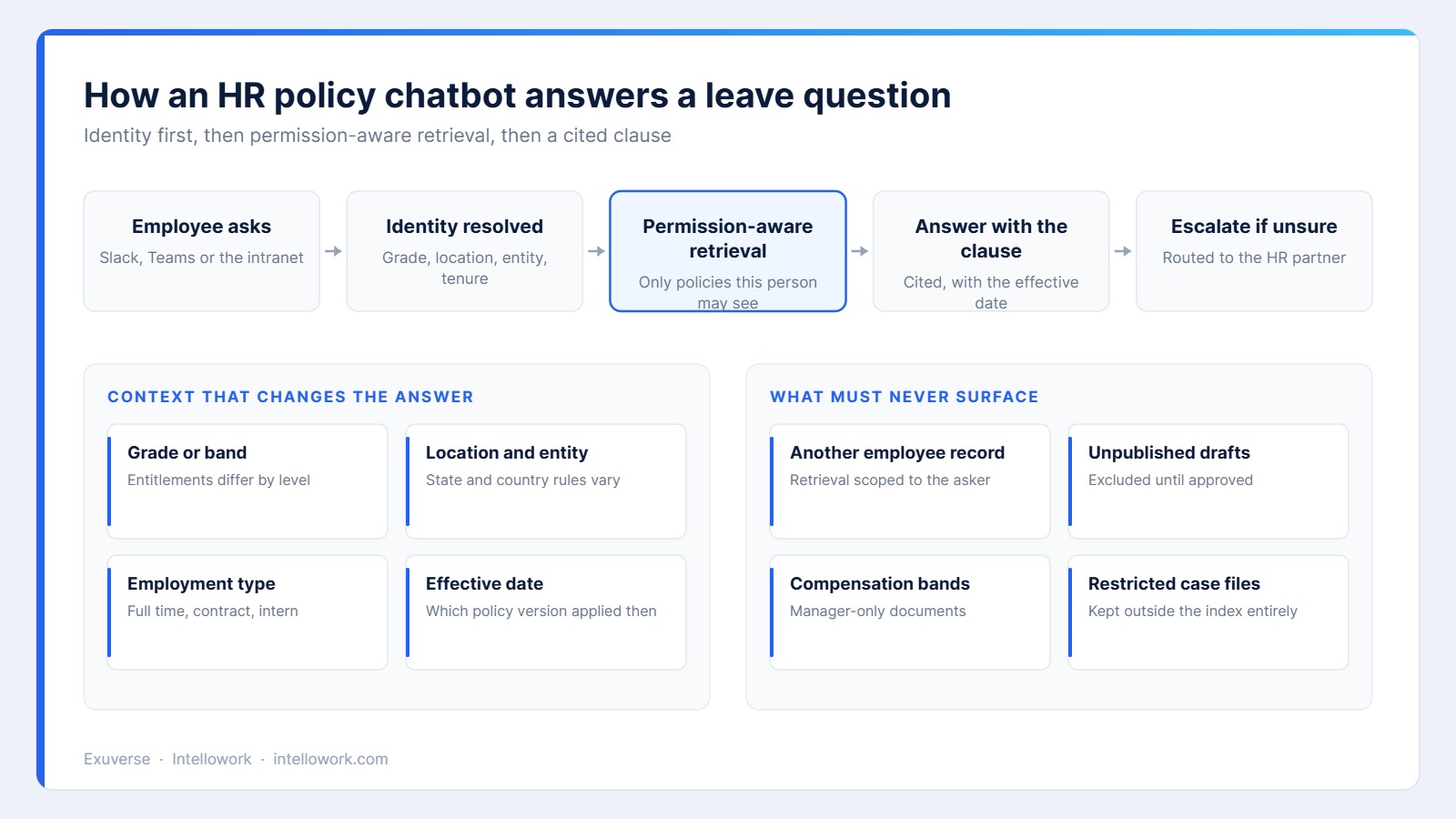
An HR policy chatbot has a harder job than a customer support bot. The questions look simple, yet the correct answer depends on who is asking, where they work and which version of the policy applied at the time.
Get that wrong and the damage is quiet but real. An employee plans leave around a rule that does not apply to their grade, or a manager quotes a superseded clause in a difficult conversation. This guide explains how to build an assistant that HR can actually stand behind.
Why HR teams drown in repeat questions
The pattern is familiar in every company above a few hundred people. Roughly a dozen questions generate most of the volume: leave balance rules, notice periods, reimbursement limits, insurance coverage, probation terms and referral bonuses.
The answers already exist in published policies. However, employees cannot find them, since intranet search matches words rather than meaning. So they message HR directly, and an experienced partner spends the afternoon quoting documents instead of doing the work only they can do.
What makes an HR policy chatbot different
Four constraints separate this from a public support assistant. Each one changes the architecture rather than the wording.
- The answer depends on the asker’s grade, location, entity and employment type.
- Policies change, so the version and effective date matter as much as the text.
- Some documents must never appear, including drafts and manager-only material.
- The questions themselves are sensitive, so logging and access need care.
Permission-aware retrieval is the foundation
Many assistants apply access rules after retrieval, filtering results before display. That approach leaks, because the model has already read the restricted passage and can summarise it.
Instead, permissions belong in the index. Every chunk carries the access rules of its source document, and the search itself only sees what the asker may see. We explained the mechanism in our note on role-based access in AI chatbots.
Your policy library decides how good the answers are
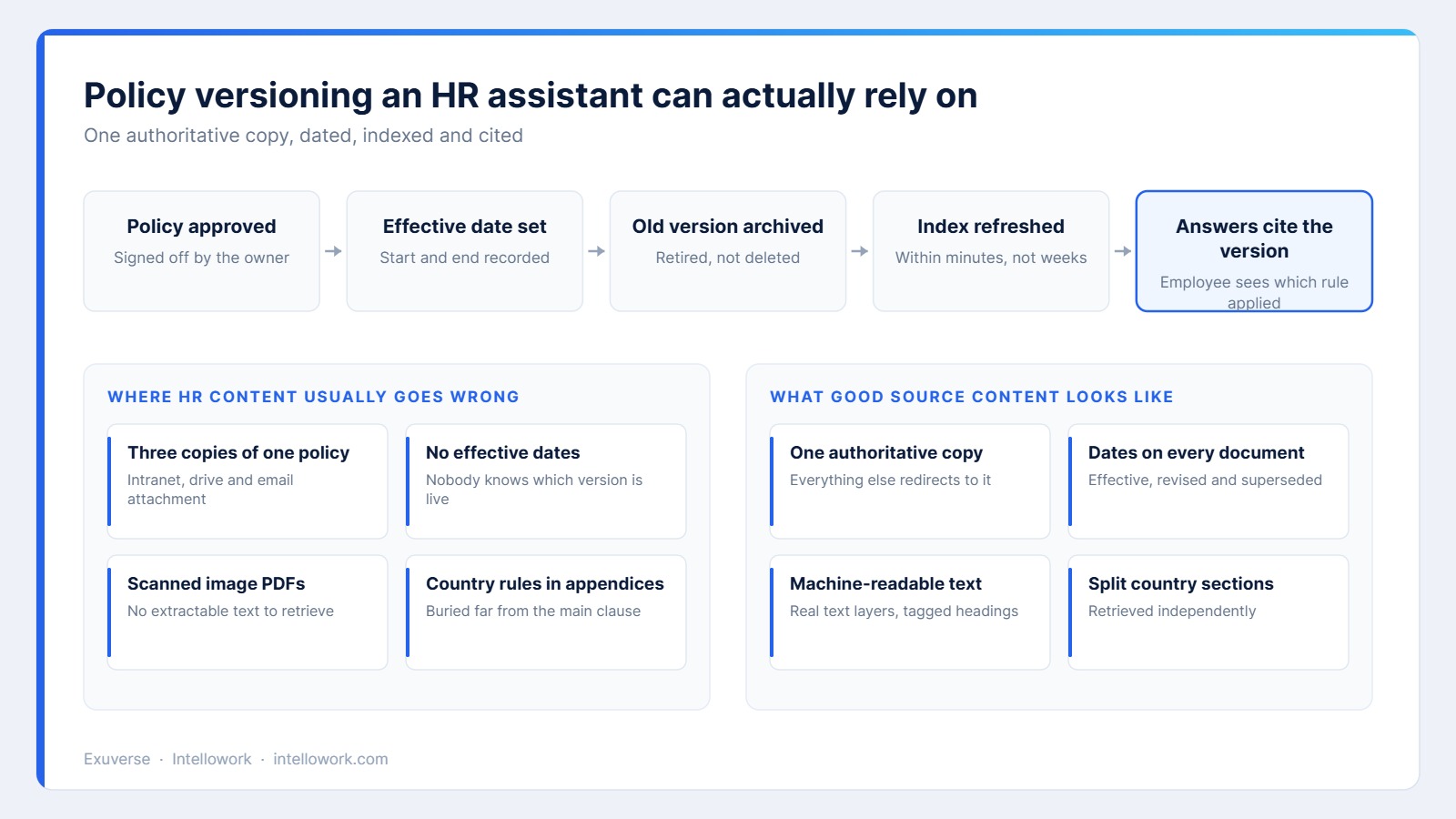
Before any model work, audit the library. Teams almost always find the same four issues: duplicate copies of one policy, missing effective dates, scanned image files with no extractable text, and country rules buried in appendices.
| Problem | Effect on answers | Fix |
|---|---|---|
| Duplicate copies | Conflicting answers to the same question | Keep one authoritative copy, redirect the rest |
| No effective dates | Old rules quoted as current | Add effective, revised and superseded dates |
| Scanned images | Policy invisible to retrieval | Run text extraction, then check quality |
| Buried country rules | Wrong entitlement for that location | Split country sections into their own units |
Where an HR policy chatbot should live
Employees will not visit a new portal. Therefore the assistant should appear where they already talk, which is usually Slack or Microsoft Teams, with the intranet as a secondary surface.
Threaded replies work well, since a follow-up question keeps its context. Private channels matter too, because people ask about pay and leave without wanting an audience. We covered the deployment pattern in our guide to an AI chatbot for Slack and Teams.
Handling the questions an HR policy chatbot must not answer
Some questions look procedural but are not. A grievance, a workplace complaint or a question about someone else’s employment status all need a person, and they need one quickly.
Consequently the design should include an explicit route rather than a refusal. Detect the topic, acknowledge it briefly, and hand over to the named HR partner with the conversation attached. Silence and generic policy quotes both feel dismissive here.
Privacy: what to log and who may read it
Employee questions reveal a great deal. Under India’s Digital Personal Data Protection Act, they are personal data, and they deserve tighter handling than customer chat logs.
- Store transcripts with a defined retention period, and enforce it automatically.
- Restrict access to a small named group, and log every read.
- Aggregate reporting by default, so trends are visible without identities.
- Publish an internal notice explaining what is kept and for how long.
Our overview of enterprise AI chatbot security and compliance covers residency and retention in more depth.
Connecting the HRMS turns answers into service
Policy answers only go so far. Most employees actually want a number: their remaining leave, their reimbursement status, their insurance member identifier.
So connect a small set of read-only actions to the HRMS, each scoped to the person asking. Balance lookup, claim status and document retrieval cover most of the volume. Keep write actions such as leave application behind a confirmation step, and log every call.
Measuring an HR policy chatbot properly
| Metric | Why it matters | Reasonable target |
|---|---|---|
| Resolution rate | Questions answered without HR involvement | 50 to 70 percent after tuning |
| Answer accuracy | Sampled replies verified against policy | Above 95 percent |
| Correct version cited | Guards against superseded rules | Effectively 100 percent |
| Escalation quality | Handovers the HR partner agrees with | Above 85 percent |
| Time saved per week | HR hours returned to real work | Tracked against a baseline |
The wider measurement discipline, including how to turn hours saved into a defensible number, is covered in our guide to AI chatbot ROI.
A 45-day rollout plan
- Days 1 to 10: export the top 50 questions HR received last quarter, and audit the matching policies.
- Days 11 to 20: clean the library, add effective dates, and split country sections.
- Days 21 to 30: connect identity, then test retrieval against known-answer questions before any launch.
- Days 31 to 45: pilot with one department, sample every conversation, and publish the escalation route clearly.
Announce it as a policy lookup assistant rather than a replacement for HR. Expectations set early are much easier to meet.
Common HR policy chatbot mistakes
- Indexing the whole shared drive, which pulls drafts and manager-only files into scope.
- Ignoring effective dates, so the assistant quotes last year’s rules confidently.
- Filtering results after retrieval instead of restricting the index itself.
- Launching without an escalation route for sensitive topics.
- Measuring usage rather than accuracy, which hides the answers that were wrong.
Where Intellowork fits
Intellowork indexes your approved policy set with document-level permissions carried into the index, so retrieval never reaches material an employee may not see. Answers cite the clause and the version, which gives HR a fast way to audit anything questioned.
The same knowledge base serves Slack, Microsoft Teams, the intranet widget and voice, and scoped actions can read from your HRMS. You can see the platform at Intellowork, or start with our enterprise chatbot evaluation checklist.
Frequently asked questions
Can an HR policy chatbot see salary data?
Only if you index it, and generally you should not. Compensation documents belong outside the assistant’s scope, while individual figures should come from a scoped HRMS lookup that returns data about the asker alone.
How does it handle different countries?
Location becomes part of the retrieval context, so country sections are matched to the employee. Splitting those sections into separate units improves accuracy far more than prompt instructions do.
What happens when a policy changes mid-year?
The new version is indexed with its effective date, and the old one is archived rather than deleted. Answers then cite the version, which matters when someone asks what applied last quarter.
Will employees trust it?
They trust it when answers show the clause they came from. Citations also let HR correct the source once, instead of correcting the same answer repeatedly.
Does it replace the HR service desk?
No. It removes repeat lookups so the team can spend time on cases that need judgement. Sensitive conversations should always route to a person quickly.
How long does an HR policy chatbot take to deploy?
Six to eight weeks is realistic, and most of that is content work. Identity integration and channel setup are usually the quickest parts of the project.
The takeaway
An HR policy chatbot works when three things are true. The policy library is clean and dated, permissions live inside the index rather than in front of it, and every answer shows the clause behind it. With those in place the assistant removes a real burden from HR, and employees get correct answers at the moment they need them.
Related reading
- Company internal chatbot solution
- AI chatbot for employees and the knowledge base
- Internal knowledge base chatbot architecture
- Enterprise search software in India
Written by the Exuverse team, led by Tarun Gupta, who builds enterprise retrieval and assistant systems for Indian and global teams.
Read next: AI onboarding assistant: getting new hires productive in week one