
A documentation chatbot is the fastest way to make a docs site useful at 2 a.m., when the reader is stuck, the search box has failed them twice, and support is offline. Yet most teams ship one, watch it hallucinate a config flag that never existed, and quietly remove it three weeks later.
The failure is rarely the model. It is almost always retrieval, content hygiene, and the absence of an answer policy. This guide walks through how a documentation chatbot actually works end to end, the five failure modes that kill them, the metrics that tell you whether yours is working, and a realistic 30-day rollout for a product or docs team.
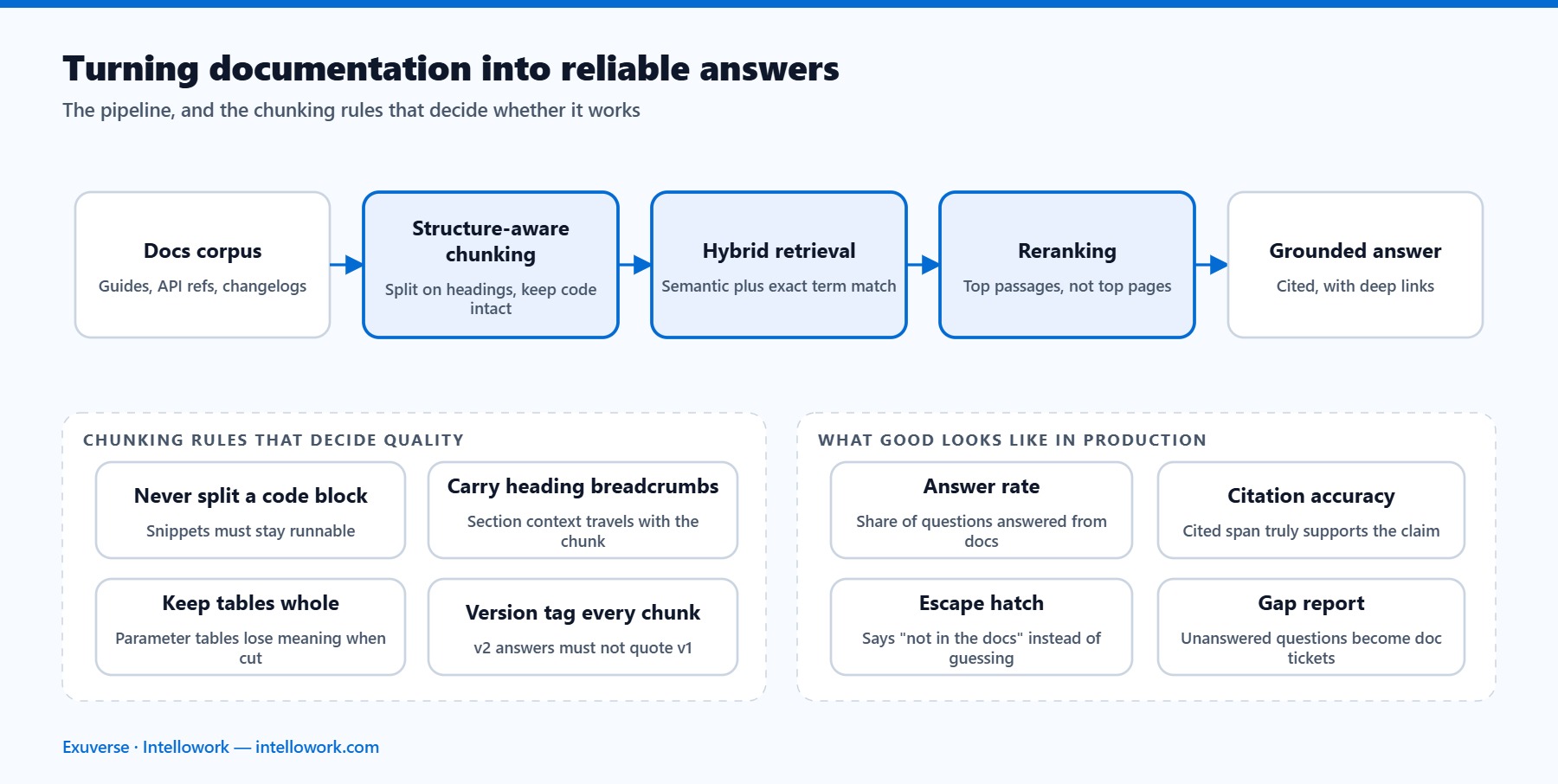
What a documentation chatbot is (and what it is not)
A documentation chatbot is a retrieval-grounded question-answering layer sitting on top of content you already maintain: your docs site, API reference, changelog, guides, and sometimes your support macros. A reader asks a question in natural language. The system retrieves the passages most likely to contain the answer, and a language model writes a short response that cites those passages.
That definition rules out three things people often confuse it with:
- It is not a fine-tuned model. Fine-tuning teaches style and format, not facts that change every sprint. Docs change weekly; model weights should not.
- It is not a search box with a chat skin. Search returns pages and lets the reader do the synthesis. A chatbot does the synthesis and must therefore be held to a much higher accuracy bar.
- It is not a support agent. It answers documented questions. Anything account-specific, contractual, or undocumented belongs in a ticket, and the bot should say so rather than guess.
Getting that scope right on day one prevents most of the disappointment later. The bot’s job is to answer what your docs already answer, faster and in the reader’s own words.
Why documentation search fails, and why chat is the fix
Classic docs search matches strings. Readers do not think in strings. Someone whose deploy is failing types “why does my build hang on step 3”, while the page that solves it is titled “Configuring build timeouts”. No shared vocabulary, no match, no answer.
Three structural problems compound that vocabulary gap:
- Answers span pages. A real question often needs the auth page, the rate-limit page, and one line from the changelog. Search hands over three tabs and hopes.
- Versioning fragments everything. With v1, v2, and beta docs live simultaneously, keyword search happily serves the wrong version.
- Nobody reads past result three. If relevance is mediocre, the reader files a ticket instead, and your support cost absorbs the docs problem.
A well-built documentation chatbot closes the vocabulary gap with semantic retrieval, stitches multi-page answers together, and filters by version before it ever generates text. That is the whole value proposition, and every design decision below serves it.
How a documentation chatbot works, stage by stage
Under the hood, the pipeline has six stages. Each one has a failure mode, and each one is tunable independently, which is exactly why you want to understand them before choosing a vendor.
1. Ingestion and chunking
Your docs get pulled in from a sitemap, a Git repository, or a CMS API, then split into retrievable chunks. Chunking is where most quality is won or lost. Split on semantic boundaries such as headings and code blocks rather than on a fixed character count, keep the heading trail with each chunk so the model knows a snippet came from “Billing > Webhooks > Retries”, and never split a code sample from the sentence that explains it.
2. Enrichment and metadata
Every chunk should carry structured metadata: product, doc version, language, last-updated date, audience, and canonical URL with an anchor. Metadata is what lets you filter to v2 only, boost recently updated content, and link the reader to the exact heading instead of the top of a 4,000-word page.
3. Hybrid retrieval
Vector search alone misses exact identifiers, and error codes, flag names, and SDK method names are exactly what docs readers paste in. Keyword search alone misses paraphrase. Running both and fusing the results is the reliable default, which we cover in depth in our guide to hybrid RAG with keyword and vector search.
4. Reranking
Retrieve broadly, then rerank tightly. Pull 40 to 60 candidate chunks, score them with a cross-encoder reranker, and pass only the top handful to the model. This single step typically moves answer quality more than swapping the underlying language model, and it costs milliseconds.
5. Grounded generation
The model receives the reranked passages and a strict instruction: answer only from these passages, cite the passage you used, and refuse when the passages do not contain the answer. A confidence threshold sits in front of generation, so a weak retrieval result produces an honest “I could not find this in the docs” plus a search link, rather than a confident invention.
6. Citation and handoff
Every claim links back to a specific docs anchor the reader can open and verify. When the bot refuses or the reader is unsatisfied, a one-click handoff creates a ticket carrying the full conversation, so nobody retypes their problem. The original retrieval-augmented generation paper laid out the grounding principle; the citation and handoff layer is what turns it into something a docs team can actually stand behind.
The five failure modes that kill a documentation chatbot
Almost every abandoned project we have reviewed died from one of these five. Diagnose which one you have before you change anything else.
| Failure mode | What the reader sees | Actual cause | Fix |
|---|---|---|---|
| Confident invention | A flag or endpoint that does not exist | No confidence threshold; model allowed to answer from priors | Refusal policy plus grounded prompting and citation enforcement |
| Version bleed | v1 syntax served to a v2 user | No version metadata or filter at retrieval time | Version-scoped index with a filter bound to the reader’s docs version |
| Stale answers | Deprecated steps quoted as current | Index refreshed manually, or never | Reindex on docs build; show last-updated date in the citation |
| Shallow retrieval | “I could not find that” on documented topics | Bad chunking, no reranker, vector-only search | Semantic chunking, hybrid retrieval, cross-encoder rerank |
| Leaky permissions | Internal or unreleased content surfaced publicly | Access rules applied after retrieval, not inside it | Permission-aware index; ACLs travel with each chunk |
The last row deserves emphasis for anyone whose docs mix public and partner content. Filtering results after the model has already read them is not a control, it is a hope. We unpack the correct pattern in role-based access control for AI chatbots.
Your docs are the product: content prep that pays off
Retrieval quality is bounded by content quality. No amount of model tuning rescues a docs set that contradicts itself. Before launch, spend a week on these:
- Kill duplicates. Two pages describing the same setup with different steps will produce a coin-flip answer. Pick a canonical page and redirect the other.
- Date everything. A visible last-updated field lets both the ranking logic and the reader judge freshness.
- Write answer-shaped headings. “Configuring build timeouts” is fine for navigation; “Why does my build hang?” retrieves far better. Add both where it makes sense.
- Expand your jargon. Include the customer’s word for the thing at least once per page. If users say “API key” and your docs say “client credential”, the retriever needs to see both.
- Fix orphan code blocks. A snippet with no surrounding prose is unretrievable and unciteable.
This work is not wasted if the chatbot project stalls. It improves your organic search rankings, your on-site search, and the experience of every reader who never opens the chat widget at all.
Metrics that actually tell you if it is working
“Number of conversations” is a vanity metric. Track these instead, and instrument them from day one rather than retrofitting later.
| Metric | Definition | Healthy range |
|---|---|---|
| Answer rate | Questions answered rather than refused | 65–85% for mature docs |
| Groundedness | Claims traceable to a cited passage | >95% |
| Citation click rate | Readers opening a cited source | 15–30% (higher means low trust) |
| Escalation rate | Conversations ending in a ticket | Falling month over month |
| Time to first token | Perceived responsiveness | <1 second |
| Unanswered clusters | Repeat questions with no answer | Your docs backlog, ranked |
That last row is the sleeper benefit. A documentation chatbot is a continuous, unfiltered record of what your users cannot find, ranked by frequency. Most docs teams have never had a backlog that honest. Pair it with proper tracing, as described in our piece on LLM observability for internal AI assistants, and you can see exactly which retrieval step failed on any given conversation.
Set up a golden question set of 100 to 200 real questions with approved answers, and run it on every index change. Without a regression suite you are tuning blind. Our guide on how to evaluate RAG system performance covers the scoring approach in detail.
Build or buy: what changes for a docs team
Building a demo takes a weekend. Building the parts that keep it trustworthy takes quarters: evaluation harness, permission-aware indexing, versioned reindexing on every docs build, feedback capture, analytics, and multi-channel delivery.
Build when retrieval logic is genuinely your differentiator, you have an engineer who owns it permanently, and your compliance posture requires full control of the stack. Buy when your team’s scarce resource is engineering time and the chatbot is a feature of your docs rather than a product in itself, which describes most docs and product teams. We walk through the full decision framework in build vs buy for enterprise AI chatbots.
Whichever way you go, insist on four non-negotiables: citations on every answer, a configurable confidence threshold, permission-aware retrieval, and an exportable conversation log you own.
A realistic 30-day rollout
Ambitious enough to matter, small enough to finish:
- Week 1 — Scope and clean. Pick one product area and one docs version. Deduplicate, date, and fix orphan snippets in that slice only.
- Week 2 — Index and evaluate. Ingest, chunk semantically, build the golden question set, and measure baseline answer rate and groundedness. Do not touch the UI yet.
- Week 3 — Tune retrieval. Add reranking, adjust chunk size, tighten the confidence threshold until refusals feel appropriate rather than annoying. Re-run the golden set after every change.
- Week 4 — Ship narrow. Launch on that one docs section with visible citations, a thumbs-up/down control, and a ticket handoff. Review every negative rating personally for the first fortnight.
Expand section by section only after the answer rate holds above your threshold for two consecutive weeks. Teams that launch across all docs on day one spend the following month firefighting instead of improving.
Frequently asked questions
How much does a documentation chatbot cost to run?
Inference is usually the smallest line item. For a docs site handling a few thousand questions a month, model and embedding costs typically land in the tens of dollars. The real cost is engineering time for indexing, evaluation, and maintenance, which is precisely why most docs teams choose a platform over a custom build.
Will it hurt my SEO if answers replace page views?
Page views may dip while task success rises. Since the chatbot lives behind a widget and cites canonical URLs, your indexed pages remain the source of truth for search engines. In practice, the content clean-up required to make retrieval work tends to improve organic rankings.
How do I stop it from answering questions outside the docs?
Combine a retrieval confidence threshold with a scope instruction and an explicit refusal path. When retrieval scores fall below the threshold, the system should decline and offer search or a ticket instead of generating. See our guide to AI guardrails that reduce hallucinations.
How often should the index be refreshed?
On every docs build. Wire reindexing into your CI pipeline so a merged pull request updates the index within minutes. Nightly crawls are acceptable for slow-moving docs; weekly is how stale answers start.
Can it handle multiple docs versions and languages?
Yes, provided version and language are indexed as filterable metadata and the widget passes the reader’s current context at query time. Without that filter, multi-version docs are the single most common source of wrong answers.
Where to start
A documentation chatbot is worth building when you treat it as a retrieval problem with an editorial component, not as a model problem. Clean the content, make retrieval hybrid and version-aware, enforce citations, measure groundedness, and expand only when the numbers hold.
If you would rather not assemble that pipeline yourself, IntelloWork ships it as a platform: hybrid retrieval with configurable confidence thresholds, permission-aware indexing, citations on every answer, and deployment to a web widget, Slack, Teams, WhatsApp, or API. It is built on the principle that a docs answer nobody can verify is not an answer.
Next in this series: how to add an AI chatbot to Docusaurus, GitBook, MkDocs and ReadMe, and how to design AI chatbot citations that readers actually trust.
Related reading: Choosing a platform to run this on? Our comparison of enterprise AI chatbot platforms covers the options.