
Shipping an AI chatbot for documentation looks like a one-line job: paste a script tag, watch the widget appear, celebrate. Then the first real question arrives, the bot quotes a deprecated endpoint from your v1 docs, and you discover that the embed was the easy 5% of the work.
This is the practical version. Below, it covers the three decisions to make before you embed anything, how to get your docs into a clean index, platform-by-platform installation for Docusaurus, GitBook, MkDocs, ReadMe and custom sites, and the QA and freshness steps that separate a widget people use from one they mute.
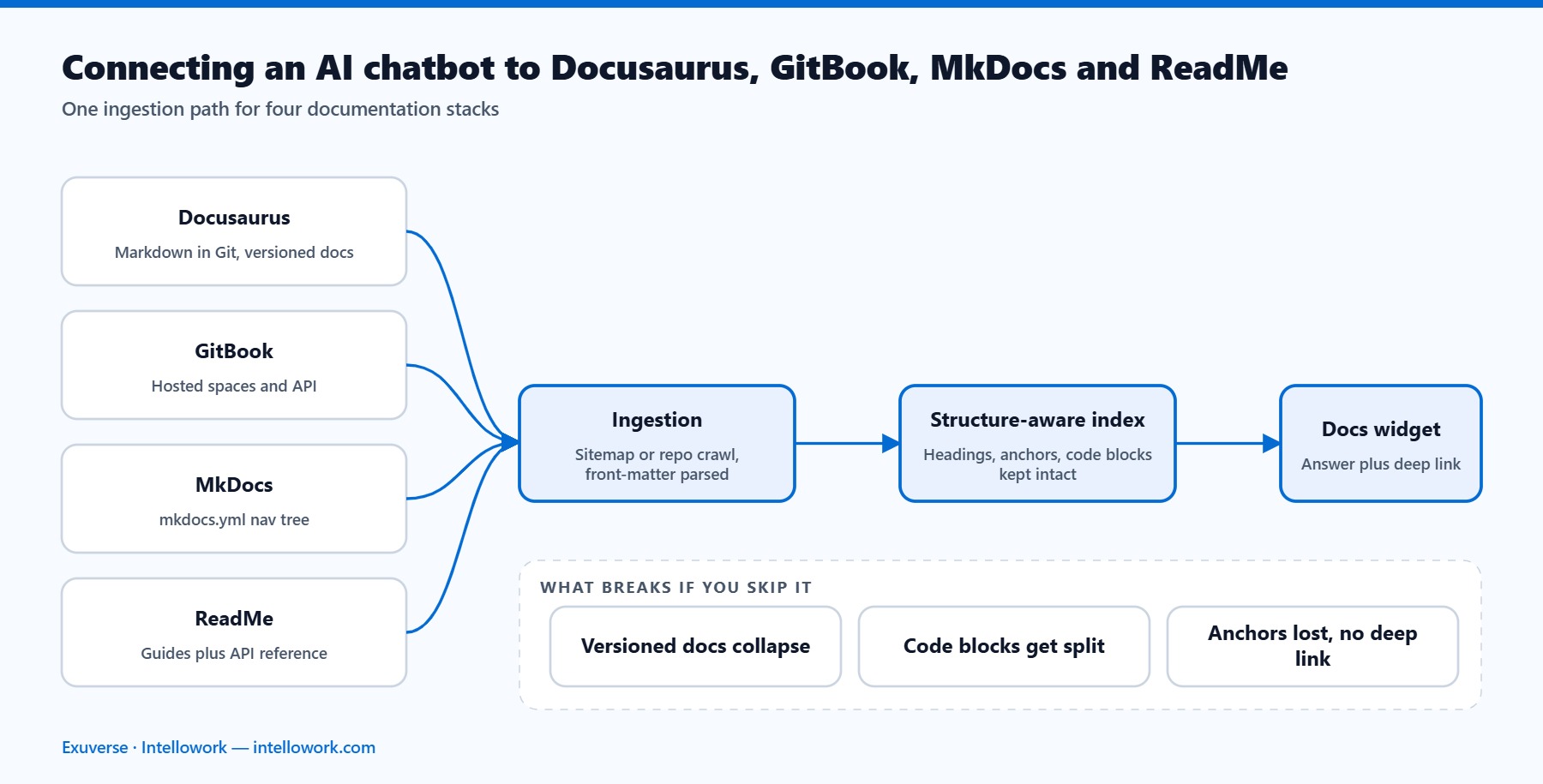
Three decisions before you embed an AI chatbot for documentation
Otherwise you will be re-doing the integration in a month. In practice, each takes an hour of discussion, not a sprint.
Decision 1: What is in the index, and what is deliberately out
The tempting answer is “everything”. The correct answer is usually narrower. Specifically, include your guides, API reference, tutorials, and changelog. Think hard before including your blog, which ages badly and reads as authoritative; marketing pages, which promise rather than instruct; and internal RFCs, which are not for customers.
Therefore, write the include and exclude lists down as URL patterns now. In turn, they become your crawl configuration in ten minutes’ time.
Decision 2: Your answer policy
Next, decide explicitly what happens when the system is unsure. As a rule, below the confidence threshold, the bot declines, shows the three closest docs pages, and offers a ticket. In contrast, teams that leave this undefined get a bot that answers everything, which is the same as a bot that can be trusted with nothing.
Decision 3: Where an unanswered question goes
A dead end is a wasted signal. Finally, route unanswered questions somewhere a human sees them, whether that is a support queue, a Slack channel, or a weekly digest to the docs team. Indeed, this is how the chatbot starts paying for itself: it hands you a ranked, evidence-backed docs backlog.
Step 1: Give your AI chatbot for documentation a clean index
There are three ways to feed content into an AI chatbot for documentation, and they are not equivalent.
| Source | Best for | Watch out for |
|---|---|---|
| Sitemap crawl | Fastest start; any published docs site | Picks up nav chrome, cookie banners and footers unless you set content selectors |
| Git repository (Markdown/MDX) | Highest fidelity; docs-as-code teams | Front matter and components need parsing rules; unpublished branches must be excluded |
| CMS or docs API | Structured metadata comes for free | Rate limits; incremental sync logic needed |
If your docs live in Git, prefer the repository. You get headings, code fences, and front matter intact, which makes chunking cleaner and metadata richer than anything a crawler can infer from rendered HTML.
Three indexing rules matter more than the rest:
- Chunk on headings, not character counts. Keep the full heading trail attached to each chunk, and never separate a code block from its explanation.
- Tag every chunk with version and language. Then filter on them at query time. Multi-version docs without a version filter is the number one cause of wrong answers.
- Strip navigation and boilerplate. A sidebar repeated across 400 pages will otherwise dominate your retrieval scores.
For the retrieval mechanics underneath, our guide to hybrid RAG with keyword and vector search explains why exact-match retrieval still matters when readers paste error codes and SDK method names.
Step 2: Install the AI chatbot for documentation, platform by platform
Most platforms accept a script tag plus a small amount of configuration. What differs is where you put it and how you pass the reader’s current version so answers stay scoped.
Docusaurus
Add the widget through docusaurus.config.js using the scripts array, or wrap the layout with a swizzled component if you need to pass runtime context. The config route is enough for most sites:
// docusaurus.config.js
module.exports = {
  scripts: [
    {
      src: 'https://cdn.example-chat.com/widget.js',
      async: true,
      'data-project': 'YOUR_PROJECT_ID',
      'data-version': 'v2',
    },
  ],
};
If you run versioned docs, read the version from the URL path and pass it to the widget at runtime rather than hard-coding it. Docusaurus keeps versions under /docs/<version>/, so a small script that parses the path and calls the widget’s context API keeps answers correctly scoped.
GitBook
GitBook restricts arbitrary script injection on some plans. Where custom scripts are available, add the snippet under your space’s customization or integrations settings. Where they are not, two options remain: use GitBook’s own integrations directory, or point the chatbot at your published docs domain and surface it from a page you control, such as a support portal or in-app help panel.
Either way, index GitBook content via its published sitemap and set the content selector to the main article container so navigation is excluded.
MkDocs and Material for MkDocs
Use theme overrides. Create overrides/main.html, extend the base template, and drop the script into the extrahead block:
{% extends "base.html" %}
{% block extrahead %}
  <script async src="https://cdn.example-chat.com/widget.js"
          data-project="YOUR_PROJECT_ID"></script>
{% endblock %}
Then register the directory in mkdocs.yml with theme.custom_dir: overrides. Because MkDocs sites are static Markdown, indexing straight from the repository usually beats crawling the built site.
ReadMe
ReadMe exposes custom JavaScript and CSS in project settings, which is where the widget snippet goes. Its API reference pages are generated from your OpenAPI specification, so index the specification directly alongside the guides. That gives the retriever precise parameter names and response codes instead of rendered tables it has to reverse-engineer.
WordPress, Next.js and custom sites
On WordPress, add the snippet through your theme’s footer hook or a header-and-footer script plugin. With Next.js, use the framework’s script component with a lazy loading strategy so the widget never blocks first paint. On any custom stack, load the script asynchronously and after hydration; a help widget should never sit on the critical rendering path.
Step 3: Configure the answer policy for your AI chatbot for documentation
Now turn the decision you made earlier into settings. Four controls do the heavy lifting:
- Confidence threshold. Start strict. A bot that refuses slightly too often earns trust; one that guesses loses it permanently.
- Citation requirement. Require a source link on every factual claim, and render citations inline rather than as a footnote nobody scrolls to.
- Scope instruction. Tell the model in plain language what the product is and what it must decline: pricing negotiations, account-specific data, competitor comparisons.
- Escalation trigger. Two consecutive refusals, or one thumbs-down, should offer a human.
If your docs include partner-only or unreleased sections, permissions belong inside retrieval, not in a post-processing filter. Our article on role-based access control in AI chatbots covers the pattern.
Step 4: Test the AI chatbot for documentation on a real question set
Do not launch on vibes. Build a golden set of 100 to 200 questions drawn from actual sources: your site search logs, support tickets, community forum threads, and sales engineering calls. Write the approved answer and the correct source URL for each.
| Question type | Share of set | What it catches |
|---|---|---|
| Straight lookup | 40% | Baseline retrieval quality |
| Multi-page synthesis | 20% | Whether chunks combine coherently |
| Version-specific | 15% | Version filtering and metadata |
| Paraphrased or misspelled | 15% | Semantic retrieval and typo tolerance |
| Deliberately unanswerable | 10% | Refusal behaviour and hallucination rate |
That final 10% is the most important slice and the one teams always skip. Ask about features you do not have and pricing you never publish. If the bot invents an answer even once, your threshold is too loose. Our guide to evaluating RAG system performance covers scoring these runs consistently.
Re-run the whole set on every configuration change. Manual spot-checking feels faster and reliably misses regressions.
Step 5: Keep the AI chatbot for documentation index fresh
Stale answers destroy credibility faster than missing ones. Wire reindexing into the pipeline that publishes your docs, so a merged pull request updates the index within minutes:
# .github/workflows/docs.yml
- name: Reindex docs
  if: github.ref == 'refs/heads/main'
  run: |
    curl -X POST "https://api.example-chat.com/v1/reindex" \
      -H "Authorization: Bearer ${{ secrets.CHAT_API_KEY }}" \
      -d '{"source":"docs","version":"v2"}'
Add two safeguards alongside it. Surface the last-updated date inside each citation so readers can judge freshness themselves. And alert on index drift: if the document count drops sharply after a build, something broke in the crawl, and you want to know before your users do.
Five AI chatbot for documentation mistakes that show up in week two
- Indexing the blog. Two-year-old posts get quoted as current guidance. Exclude them or date-boost aggressively.
- Ignoring the widget on mobile. Half your docs traffic is mobile, where a full-screen chat panel that traps scroll is worse than no chat at all.
- No feedback control. Without thumbs up and down you have no idea which answers fail, and no data to improve on.
- Hard-coded version. The reader is on v1, the widget is pinned to v2, and every answer is subtly wrong.
- No conversation export. Your unanswered questions are the most valuable output. Make sure you can get them out of the platform.
Frequently asked questions
How long does it take to add an AI chatbot for documentation?
The embed takes under an hour on most platforms. Indexing, tuning the confidence threshold, and running a golden question set realistically take one to two weeks before you should expose it to customers.
Will the widget slow down my docs site?
Not if you load it asynchronously and after hydration. Check your Core Web Vitals before and after launch, and if the script is render-blocking, defer it. Google’s Web Vitals documentation sets out the thresholds worth holding the vendor to.
Can it answer from an OpenAPI specification as well as prose?
Yes, and it should. Index the specification as structured content so parameter names, types and response codes are retrievable exactly, rather than parsed out of rendered HTML tables.
What about docs behind a login?
Use a permission-aware index where access rules are attached to each chunk and evaluated during retrieval, with identity passed through SSO. Never rely on filtering results after generation.
Should the same bot serve customers and internal staff?
One index with permission scoping is usually cleaner than two systems, provided identity is enforced at retrieval time. See our walkthrough of internal knowledge base chatbot architecture for the internal-facing side.
Ship narrow, then expand
Launch on one docs section, with citations visible, a strict threshold, and a working escalation path. Read every thumbs-down for two weeks. Expand only when the answer rate holds steady.
If you would rather configure this than build it, IntelloWork handles the indexing, hybrid retrieval, confidence thresholds and citations, and deploys the same index to a web widget, Slack, Teams, WhatsApp or API. Your docs stay where they are; the answers travel.
Related reading: the full documentation chatbot architecture guide and how to design AI chatbot citations readers trust.