A knowledge base chatbot answers questions from your own content instead of from the open internet. To do this, it reads your help centre, policies, manuals and wikis, finds the passages that match a question, and then writes a short answer with links back to those sources. When it works, customers and employees get the right answer in seconds. When it fails, it confidently repeats last year’s policy.
Last updated: 30 September 2026
This guide explains how a knowledge base chatbot actually works under the hood, how to build the knowledge base it depends on, and how to judge whether yours is any good. It is written from the engineering side, because most problems we fix at Exuverse come from the data pipeline, not from the language model.
What is a knowledge base chatbot?
A knowledge base chatbot is a conversational assistant that is grounded in a defined set of documents. In other words, it does not “know” things on its own. Instead, it retrieves relevant text from your content at the moment someone asks, and it uses a large language model (LLM) only to phrase the answer.
Technically, this pattern is called retrieval augmented generation, or RAG. It matters for two reasons. First, your answers stay current, because updating a document updates the answer. Second, every answer can cite its source, so a reader can check it in one click.
Older FAQ bots worked differently. They matched a question to a fixed list of intents and returned a canned reply. As a result, they broke whenever someone phrased a question in a new way. A modern knowledge base chatbot handles new phrasing because it searches by meaning as well as by keywords.
How a knowledge base chatbot actually works
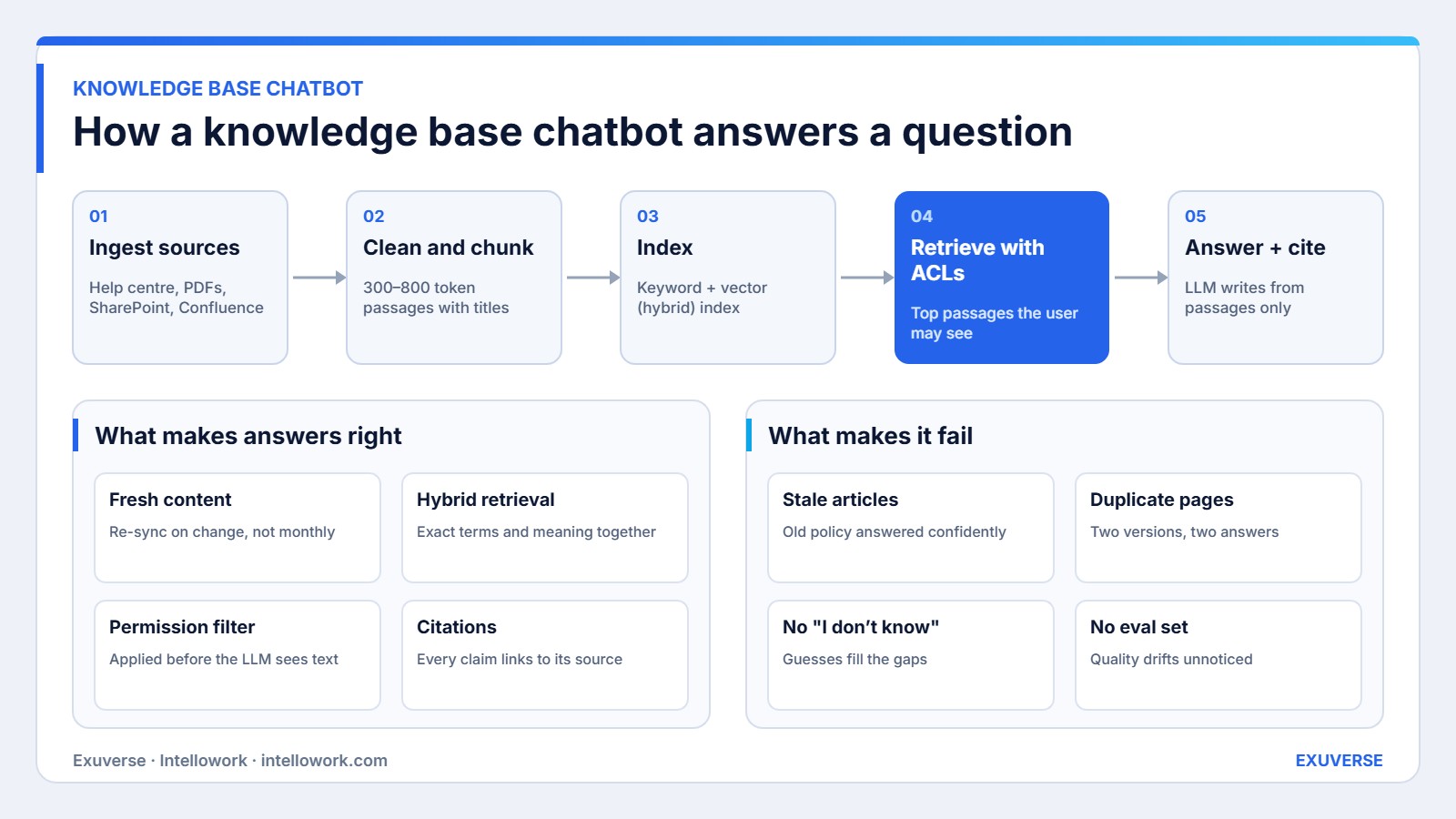
Every reliable knowledge base chatbot runs the same five-stage pipeline shown in the diagram above. The stages are simple to describe. However, each one hides decisions that decide answer quality.
1. Ingest the sources
First, connectors pull content from where it already lives: a help centre, SharePoint, Google Drive, Confluence, PDFs or a product database. Good connectors also capture metadata, such as the owner, the last edit date and who is allowed to read each file. That metadata becomes important later.
2. Clean and chunk
Next, the pipeline strips navigation, footers and duplicate boilerplate. Then it splits each document into passages, usually 300 to 800 tokens long. Each passage keeps its document title and section heading, because a passage that says “this applies to contract staff” is useless without knowing which policy it came from.
3. Index for keyword and meaning
After that, each passage goes into two indexes. A keyword index (BM25) catches exact terms such as product codes, form numbers and names. A vector index stores embeddings, so it can match “how many leaves do I get” to a section titled “Annual paid time off”. Using both together is called hybrid search, and it consistently beats either method alone. Microsoft’s hybrid search documentation explains the ranking maths if you want the detail.
4. Retrieve with permissions
Then, when a question arrives, the system searches both indexes and merges the results. Crucially, it filters out every passage the person asking is not allowed to see. That filter must run before the LLM reads anything. Otherwise, a salary band or a draft contract can leak into an answer. We cover the design in detail in our guide to role-based access for AI chatbots.
5. Answer and cite
Finally, the top five to ten passages go to the LLM with a strict instruction: answer only from these passages, cite each one, and say “I don’t know” if they do not contain the answer. That last rule is what separates a trustworthy assistant from a confident guesser.
A practical example: one HR question, end to end
For example, consider an employee in Pune who types: “Can I carry forward unused leave to next year?”
- Retrieval. The keyword index matches “carry forward”. Meanwhile, the vector index matches a passage titled “Leave encashment and rollover”. Hybrid ranking puts the rollover passage first.
- Permission filter. The employee is on the India payroll, so the system drops the US and UK versions of the policy. Consequently, the model never sees rules that do not apply to this person.
- Answer. The LLM replies: “Yes, you can carry forward up to 15 days of earned leave. Anything above that lapses on 31 March.” It links the exact policy section.
- Fallback. If the policy had no rollover section, the bot would say so and offer to raise a ticket with HR. It would not invent a number.
Notice that the model did very little of the hard work. The data preparation, the ranking and the permission filter did most of it. That is why two tools using the same LLM can give very different answers.
Knowledge base chatbot vs other options
Before building, it helps to compare a knowledge base chatbot with the tools teams usually already have.
| Option | How it answers | Best for | Main limit |
|---|---|---|---|
| Knowledge base chatbot (RAG) | Retrieves passages, writes a cited answer | Large, changing document sets | Only as good as the content behind it |
| Rule-based FAQ bot | Matches fixed intents to canned replies | Ten to fifty stable questions | Breaks on new phrasing |
| Site or intranet search | Returns a list of links | Users who know what to look for | Reader must open and scan documents |
| Live agent | A person reads and replies | Complex or emotional cases | Cost and wait time |
In practice, the best setups combine them. The chatbot handles routine questions, search remains available for browsing, and hard cases move to a person with the conversation attached.
How to create a knowledge base for a chatbot
Naturally, most teams ask how to build the bot. The better question is how to prepare the content. Here is the order we follow on client projects.
- List the top questions. Pull the 100 most common questions from tickets, emails and chat logs. These become your test set as well.
- Map each question to one source of truth. If two documents answer the same question differently, fix that first. Duplicates are the most common cause of wrong answers.
- Give every document an owner and a review date. Stale content produces stale answers, so ownership matters more than tooling.
- Write in answerable sections. Use clear headings, one topic per section, and plain statements such as “Refunds take 5 to 7 working days”. Long narrative pages retrieve poorly.
- Capture permissions at source. Keep access rules in SharePoint or Drive, and let the connector read them. Do not rebuild access lists by hand.
- Fill the gaps. Where the top questions have no document, write one. The chatbot will otherwise guess or refuse.
This work usually takes two to four weeks for a mid-sized company. It also improves the help centre for human readers, so the effort is never wasted.
Pros and cons of a knowledge base chatbot
| Pros | Cons |
|---|---|
| Answers stay current as documents change | Content cleanup is real work before launch |
| Every answer can be verified through citations | Poor permissions design can expose private data |
| Handles new phrasing and mixed languages | Needs ongoing evaluation, not a one-time setup |
| Deflects repetitive tickets around the clock | Cannot fix gaps where no document exists |
Customer-facing vs internal knowledge base chatbot
The same architecture serves two very different audiences. Still, the priorities change, so it helps to decide early which one you are building first.
| Factor | Customer-facing | Internal (employees) |
|---|---|---|
| Typical sources | Help centre, product docs, order data | HR policies, SOPs, wikis, contracts, tickets |
| Permissions | Mostly public content | Strict, per team and per role |
| Tone | Brand voice, short answers | Precise, with links to the full policy |
| Channels | Website widget, WhatsApp | Slack, Microsoft Teams, intranet |
| Main risk | Wrong promise to a customer | Leaking restricted documents |
Customer-facing bots usually launch faster, because the content is already public and written for readers. Internal bots, on the other hand, deliver more value per user, because employees ask more complex questions and waste more time searching. Many of our clients start internally, prove accuracy with their own staff, and then open a customer version.
Security, privacy and DPDP for a knowledge base chatbot
A knowledge base chatbot touches a lot of company data, so security cannot be an afterthought. Four controls cover most of the risk.
- Data residency. Keep indexes and model calls in a region you approve. For Indian companies, that often means an India region such as AWS Mumbai.
- Permission-aware retrieval. As explained above, filter before generation, and re-sync access rights whenever they change.
- Personal data handling. Under India’s Digital Personal Data Protection Act, chat logs that contain personal data need a purpose, a retention period and a way to erase them on request.
- Audit trail. Log which passages were retrieved for each answer. Consequently, you can explain any answer later, which auditors and legal teams will ask for.
None of these controls slow the user down. They simply need to be designed in from the first sprint rather than bolted on before launch.
Build, buy or use a platform?
There are three realistic routes. Each suits a different team.
| Route | Time to launch | Control | Good fit when |
|---|---|---|---|
| Custom build on RAG frameworks | 3–6 months | Full | You have unusual data, strict hosting rules and an ML team |
| Help desk add-on | Days | Low | All content already sits inside one help desk tool |
| Enterprise platform such as Intellowork | 2–6 weeks | High, without building the plumbing | Content is spread across many systems and permissions matter |
For a fuller comparison, read our build vs buy guide. For budgets, see AI chatbot development cost in India.
How we measure success
A knowledge base chatbot needs measurement from day one. We track four groups of signals. We do not promise numbers in advance, because they depend on your content and traffic.
- Answer quality. A fixed test set of real questions, scored for correctness, citation accuracy and correct refusals. Run it before every content or model change.
- Coverage. The share of questions that get a grounded answer versus “I don’t know”. Unanswered questions become your content backlog.
- Outcomes. Ticket deflection, time to first answer and escalation rate, compared with the period before launch.
- Trust. Thumbs up and down, citation clicks and repeat usage. Low citation clicks with high repeat usage usually signals confidence.
Our enterprise chatbot evaluation checklist turns this framework into a launch gate.
Common knowledge base chatbot mistakes
We see the same five mistakes repeatedly. Firstly, teams load everything, including outdated drafts. Secondly, they chunk by page count rather than by section, so answers lose context. Thirdly, they rely on vectors alone and miss exact codes and names. Fourthly, they apply permissions after generation, which is too late. Finally, they launch without a test set and cannot tell whether a change helped.
Each mistake is cheap to avoid early and expensive to fix after users lose trust. For the internal version of this build, our internal knowledge base chatbot architecture guide goes deeper.
Where Intellowork fits
Intellowork is the enterprise knowledge base chatbot built by Exuverse. It connects to SharePoint, Google Drive, Confluence and file shares, keeps source permissions, uses hybrid retrieval and cites every answer. It also works in Hindi and Hinglish and can run on WhatsApp, Slack and Microsoft Teams.
If your content needs a custom pipeline instead, our AI development team in Noida builds bespoke RAG systems. Either way, talk to us and we will review your top questions and content with you first.
Frequently asked questions
What is a knowledge base chatbot?
It is an AI assistant that answers questions using your own documents. It retrieves the relevant passages at question time and writes a short answer that cites them, rather than relying on what the model learned during training.
How do I create a knowledge base for a chatbot?
Start with your 100 most common questions, map each one to a single source document, remove duplicates, give every document an owner, and write in short sections with clear headings. Then connect those sources to the chatbot.
Does a knowledge base chatbot need training on my data?
Usually not. RAG systems retrieve your content at answer time, so there is no model fine-tuning. Updating a document updates the answer immediately after the next sync.
How does a knowledge base chatbot avoid wrong answers?
It answers only from retrieved passages, cites each source, and is instructed to say “I don’t know” when the passages do not contain the answer. A regular evaluation set catches regressions before users do.
Can a knowledge base chatbot respect document permissions?
Yes, if it filters passages by the user’s access rights before the language model sees them. Tools that apply permissions only to the final answer are not safe for internal content.
Can it answer in Hindi or Hinglish?
Yes. Multilingual embeddings let a question in Hinglish match an English policy, and the model can reply in the user’s language. Intellowork supports this for Indian teams.
How long does it take to launch?
With a platform, two to six weeks is typical, and most of that time goes into content cleanup and testing. A fully custom build usually takes three to six months.