
A WhatsApp AI chatbot is now the first thing most Indian customers meet when they need help. They do not open your website. They do not email support. Instead, they message the number printed on the invoice, and they expect a reply in seconds.
That expectation is reasonable, but it is hard to meet with people alone. Therefore teams turn to automation. The problem is that most WhatsApp automation still runs on rigid menu trees, so customers type a real question and receive a numbered list instead. This guide explains how a grounded WhatsApp AI chatbot works, what Meta actually charges, and how to launch one without breaking consent rules.
Why a WhatsApp AI chatbot is the default support channel in India
WhatsApp sits on almost every phone in the country. As a result, it carries a kind of traffic that no other channel sees. People send photos of damaged parcels. They send screenshots of failed payments. They ask about warranty terms at eleven at night.
Two things follow from that. First, the volume is high and repetitive, so automation pays for itself quickly. Second, the questions are messy and written in mixed languages, so keyword rules break almost immediately. A WhatsApp AI chatbot solves the second problem by reading the question rather than matching it.
What the WhatsApp Business Platform actually gives you
The consumer app and the WhatsApp Business app are not the foundation you want. Both are built for manual replies from a phone. Instead, automation runs on the WhatsApp Business Platform, which Meta exposes through the Cloud API.
In practice the platform gives you three things: a verified business number, a webhook that delivers every inbound message to your own endpoint, and a send interface for replies. Everything else, including the intelligence, comes from the system you connect behind it.
The 24-hour window is the rule that shapes everything
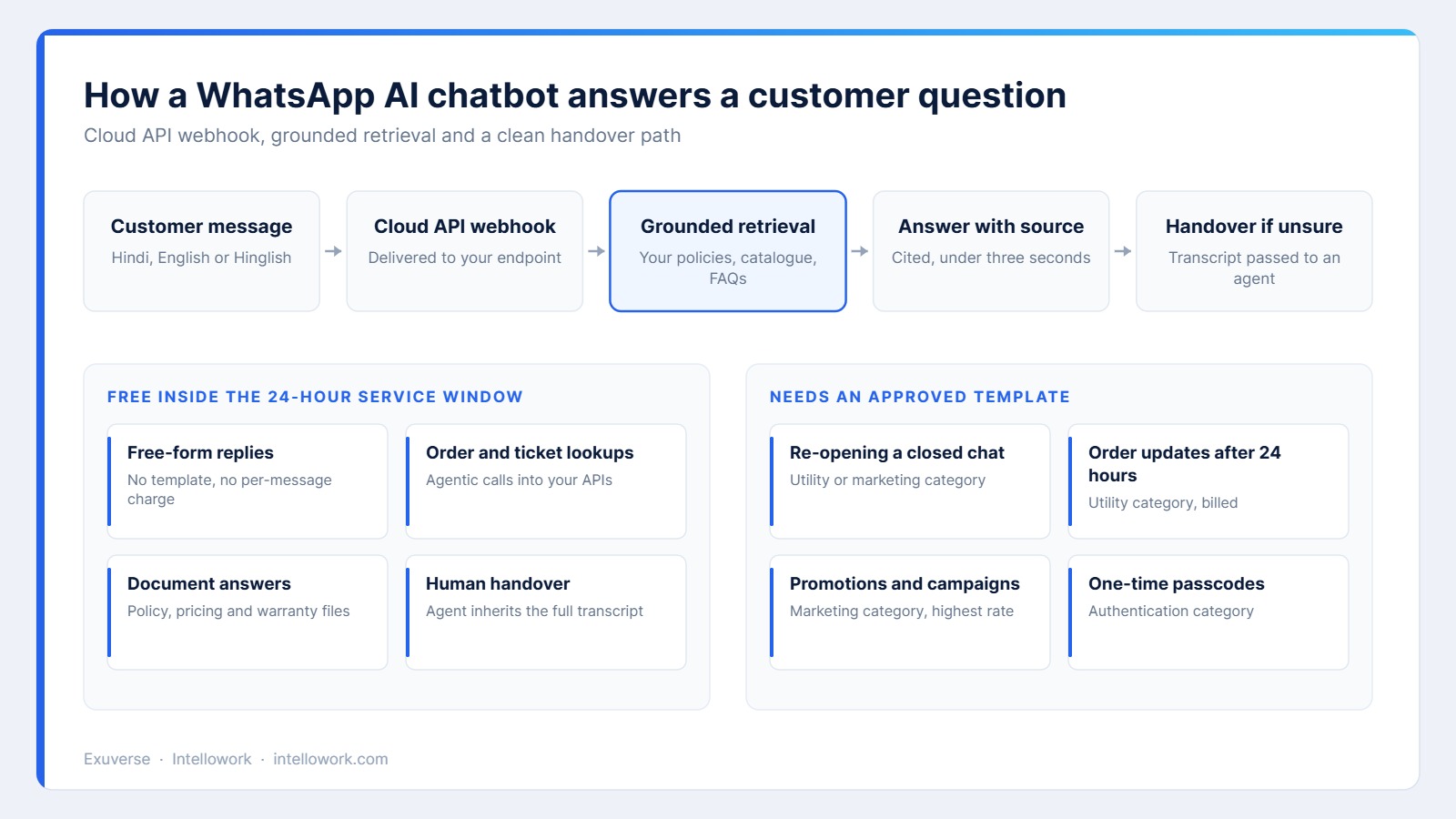
Meta separates messages into categories, and the category decides both what you may send and what you pay. Once a customer messages you, a 24-hour service window opens. Inside that window you can reply freely in your own words. Once it closes, you may only reach out with a template that Meta has already approved.
| Category | What it covers | Approved template needed | Indicative India rate |
|---|---|---|---|
| Service | Replies inside the 24-hour window | No | Free |
| Utility | Order updates, receipts, reminders | Yes | About Rs 0.115, free inside an open window |
| Authentication | One-time passcodes and login codes | Yes | About Rs 0.115 for domestic delivery |
| Marketing | Offers, launches, re-engagement | Yes | About Rs 0.86 per message |
This matters commercially. Because service replies are free, an assistant that answers well inside the window costs almost nothing to run. Marketing blasts, on the other hand, are where budgets disappear.
How a WhatsApp AI chatbot builds an answer
A grounded assistant does not improvise. It retrieves first, then writes. The sequence is short and it repeats on every message.
- The Cloud API delivers the inbound message to your endpoint.
- The system normalises the text, since Hinglish spellings vary widely.
- Retrieval searches your policies, catalogue and help articles.
- The model writes an answer using only the passages it retrieved.
- The reply goes back with a source reference, or it escalates.
Notice what is missing. There is no free-floating model answering from memory. The retrieval step is what keeps a WhatsApp AI chatbot factual, and it is the same retrieval augmented generation architecture that powers a good web assistant.
Grounding: why a WhatsApp AI chatbot must show its source
On a website, a wrong answer is embarrassing. On WhatsApp, it is a screenshot. Customers forward those screenshots, so an ungrounded reply becomes a commitment you never made.
For that reason every answer should name the document or clause it came from. Citations also give your own team a fast way to audit the bot, because a reviewer can open the cited section and judge it in seconds. We covered the mechanics of this in our guide to AI chatbot citations.
Agentic actions turn a WhatsApp AI chatbot into a service desk
Answering questions is only half the job. Most support messages ask about a specific record, not a general policy. Where is my order. Why did my payment fail. Can I move my appointment.
Consequently the assistant needs read access to your systems, not just your documents. A small, tightly scoped set of actions covers most of the volume: order lookup, ticket creation, appointment rescheduling and invoice retrieval. Each action should be permission-aware, and each should be logged. The same pattern applies when you connect an assistant to Solr and agentic AI on the search side.
What a WhatsApp AI chatbot costs to run
Budgets usually go wrong in one direction. Teams model the model cost carefully, then forget the template cost entirely. Here is a simple monthly picture for a mid-size Indian support team.
| Cost line | Assumption | Indicative monthly cost |
|---|---|---|
| Service replies | 30,000 inbound conversations | Free |
| Utility templates | 12,000 order updates outside the window | About Rs 1,380 |
| Marketing templates | 20,000 campaign sends | About Rs 17,260 |
| Model and retrieval | 30,000 grounded answers | Usually the smallest line |
| Platform or partner fee | Per workspace, per month | Fixed |
If you want a broader view of build costs across channels, our breakdown of AI chatbot development cost in India covers engineering effort as well as running cost.
Setting up a WhatsApp AI chatbot without losing weeks
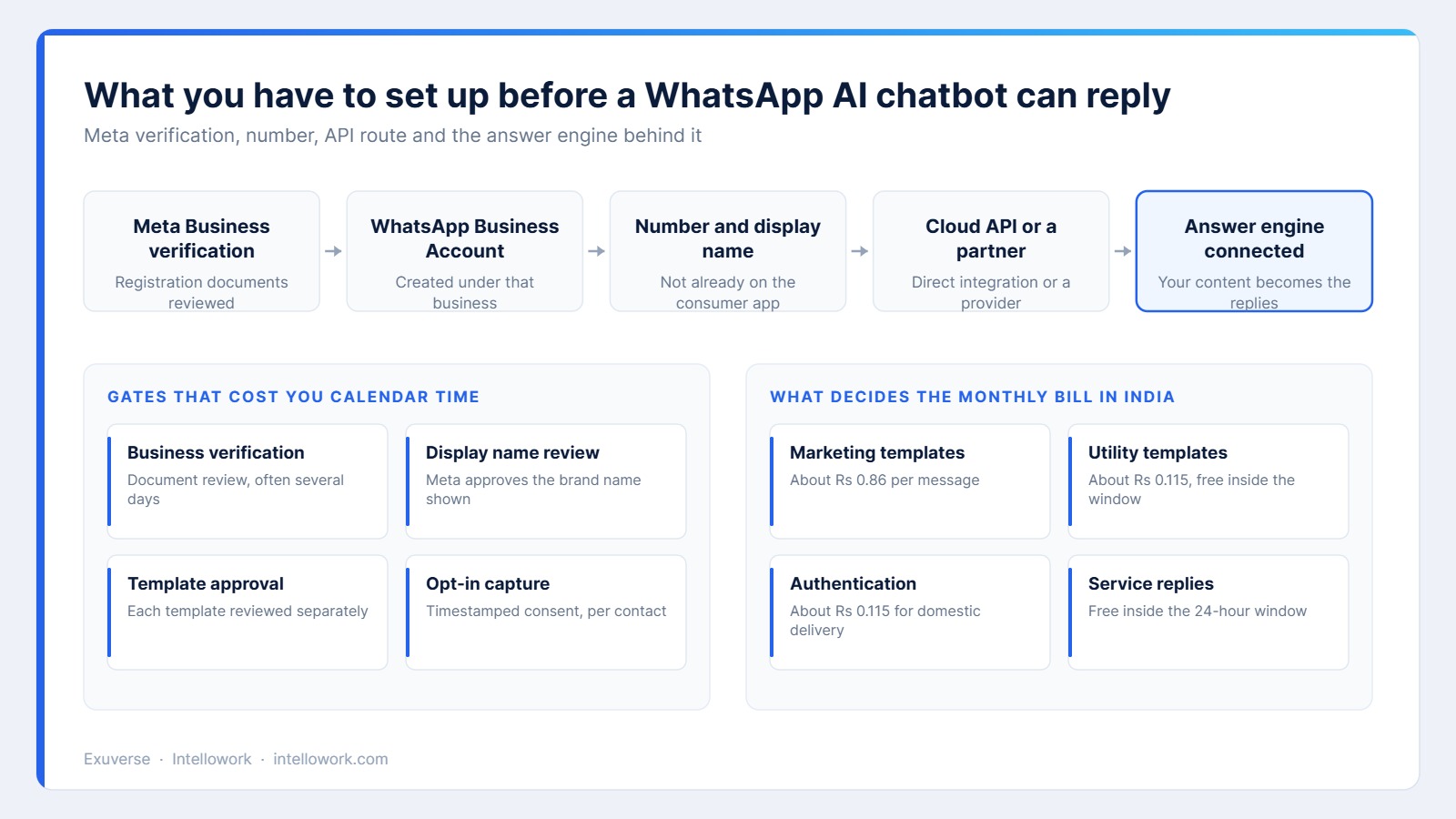
Most delays are administrative. Business verification needs registration documents and a reviewer. Display name approval is separate. Every template you plan to send is reviewed on its own, and rejections are common when the copy sounds promotional but sits in the utility category.
Therefore start the paperwork in week one and build in parallel. Choose the number carefully too, because a number already active on the consumer app has to be migrated before it can be used. Teams that sequence this correctly launch in weeks rather than months.
Consent, DPDP and keeping records you can defend
India’s Digital Personal Data Protection Act treats a support conversation as personal data. So does Meta’s own policy, which requires opt-in before you message someone. You need both, and you need them recorded.
Practically, that means storing the opt-in source, the timestamp and the exact wording shown to the user. In addition, decide how long transcripts live and who inside the company may read them. Our guide to enterprise AI chatbot security and compliance goes into the retention and residency questions in more depth.
Language: Hindi, English and Hinglish in one thread
Indian customers switch scripts mid-sentence. One message arrives in Devanagari, the next in Roman Hinglish, and the third mixes both. Keyword matching collapses here, since a single word can appear in half a dozen spellings.
Multilingual embeddings handle most of this, although transliteration normalisation and a small glossary of product terms improve accuracy sharply. We wrote about the retrieval side of this in detail in our piece on the multilingual AI chatbot.
Handover: when a WhatsApp AI chatbot should stop talking
Confident wrong answers destroy trust faster than slow ones. So set an explicit abstain rule. If retrieval returns nothing above a relevance threshold, the assistant should say it does not know and offer a human.
Handover also has to be complete. The agent who picks up the thread needs the transcript, the retrieved passages and the actions already taken. Otherwise the customer repeats themselves, which is exactly the experience you were trying to remove.
How to measure a WhatsApp AI chatbot honestly
Containment alone flatters the numbers, because a customer who gives up also counts as contained. Track resolution instead, and track it alongside quality.
| Metric | What it tells you | Reasonable target |
|---|---|---|
| Resolution rate | Conversations closed without a human | 45 to 65 percent after tuning |
| Escalation quality | Share of handovers the agent agrees with | Above 85 percent |
| Answer accuracy | Sampled replies judged correct by a reviewer | Above 90 percent |
| Time to first reply | Seconds from inbound message to answer | Under three seconds |
| Repeat contact rate | Customers returning with the same question | Falling month on month |
A 30-day plan for your first WhatsApp AI chatbot
Start narrow. A single well-answered topic beats a broad assistant that guesses.
- Week one: begin business verification, and export the 200 most common inbound questions.
- Week two: load the policies and articles that answer those questions, then test retrieval before any model work.
- Week three: connect two read-only actions, usually order status and ticket lookup, and write the abstain rule.
- Week four: run a limited pilot with real customers, sample 100 conversations, and fix the content gaps you find.
Above all, keep a human in the loop during the pilot. The content gaps you find in week four are the real product work.
Common WhatsApp AI chatbot mistakes
- Launching with a menu tree bolted in front of the assistant, which trains customers to type numbers instead of questions.
- Sending marketing templates to everyone who ever messaged support, which drives blocks and quality-rating drops.
- Skipping citations, so nobody can audit an answer after a complaint.
- Treating Hinglish as a spelling problem rather than a retrieval problem.
- Measuring containment only, which hides the customers who quietly gave up.
Where Intellowork fits
Intellowork turns the content you already have into cited answers, then serves them across every channel from one configuration. WhatsApp is one of those channels, alongside web, Slack, Microsoft Teams, Instagram and voice. Because the knowledge base is shared, an answer you fix for the website is fixed on WhatsApp at the same time.
Retrieval is permission-aware, so document-level access rules travel into the index rather than sitting in front of it. Answers carry the source section, and unresolved conversations hand over with full context. If you are comparing options, see Intellowork and our own enterprise chatbot evaluation checklist.
Frequently asked questions
Do I need a Meta business partner to run a WhatsApp AI chatbot?
Not necessarily. You can integrate directly with the Cloud API if you have engineering capacity. A partner mainly saves you setup work and billing administration, so the choice is commercial rather than technical.
Can a WhatsApp AI chatbot message customers first?
Only with an approved template and a recorded opt-in. Outside the 24-hour window, free-form messages are blocked, so proactive contact always runs through a template in the utility, authentication or marketing category.
How accurate is a WhatsApp AI chatbot in Hindi?
Accuracy depends far more on your content than on the language. With clean source documents, multilingual retrieval and a product glossary, Hindi and Hinglish answers reach similar quality to English. Test with your own phrasing before you trust a vendor benchmark.
What happens when the assistant does not know?
It should say so and offer a human. An abstain rule tied to a retrieval threshold is the safest design, because it prevents the model from filling gaps with plausible invention.
Does a WhatsApp AI chatbot store customer data?
Message content passes through Meta and through your own systems, so yes, records exist on both sides. Under the DPDP Act you should define retention periods, restrict internal access and publish a notice explaining what you keep.
How long does a first launch take?
Four to six weeks is realistic for a focused first release. Verification and template approval usually take longer than the engineering, which is why the paperwork should start on day one.
The takeaway
A WhatsApp AI chatbot is not a chat widget moved to a phone. It is a grounded answer engine wrapped in Meta’s messaging rules, and both halves need attention. Get the content and citations right, respect the 24-hour window, record consent properly, and the channel becomes the cheapest support capacity you own.
Related reading
- AI chatbot for Slack and Teams
- Custom AI chatbot for a business website
- Build versus buy for an enterprise AI chatbot
- Benefits of AI chatbots in customer service
Written by the Exuverse team, led by Tarun Gupta, who builds enterprise retrieval and assistant systems for Indian and global teams.