AI search engine integration means adding AI capabilities to the search engine you already run, rather than replacing it. Your Solr, Elasticsearch or OpenSearch cluster keeps doing what it does well: fast keyword matching, filters and facets. AI then adds the parts it lacks, such as understanding meaning, ranking by relevance and writing a short answer with sources.
Last updated: 30 September 2026
At Exuverse we have integrated AI into search platforms holding millions of documents and product records. Specifically, this guide explains how the integration actually works, which option suits which engine, and how to prove it helped.
Why AI search engine integration beats replacing your engine
To start with, classic search engines are excellent at exact matches. If a user types a part number, an invoice ID or a person’s name, BM25 keyword ranking finds it instantly. However, keyword search struggles when users describe a need in their own words. A search for “laptop won’t charge” may miss an article titled “Power adapter troubleshooting”.
On the other hand, AI-only search has the opposite problem. Vector search understands meaning well, yet it often misses exact codes and rare terms. Consequently, the strongest setups combine both. Integrating AI into your current engine gives you that combination while keeping the filters, security and infrastructure you already trust.
How AI search engine integration actually works
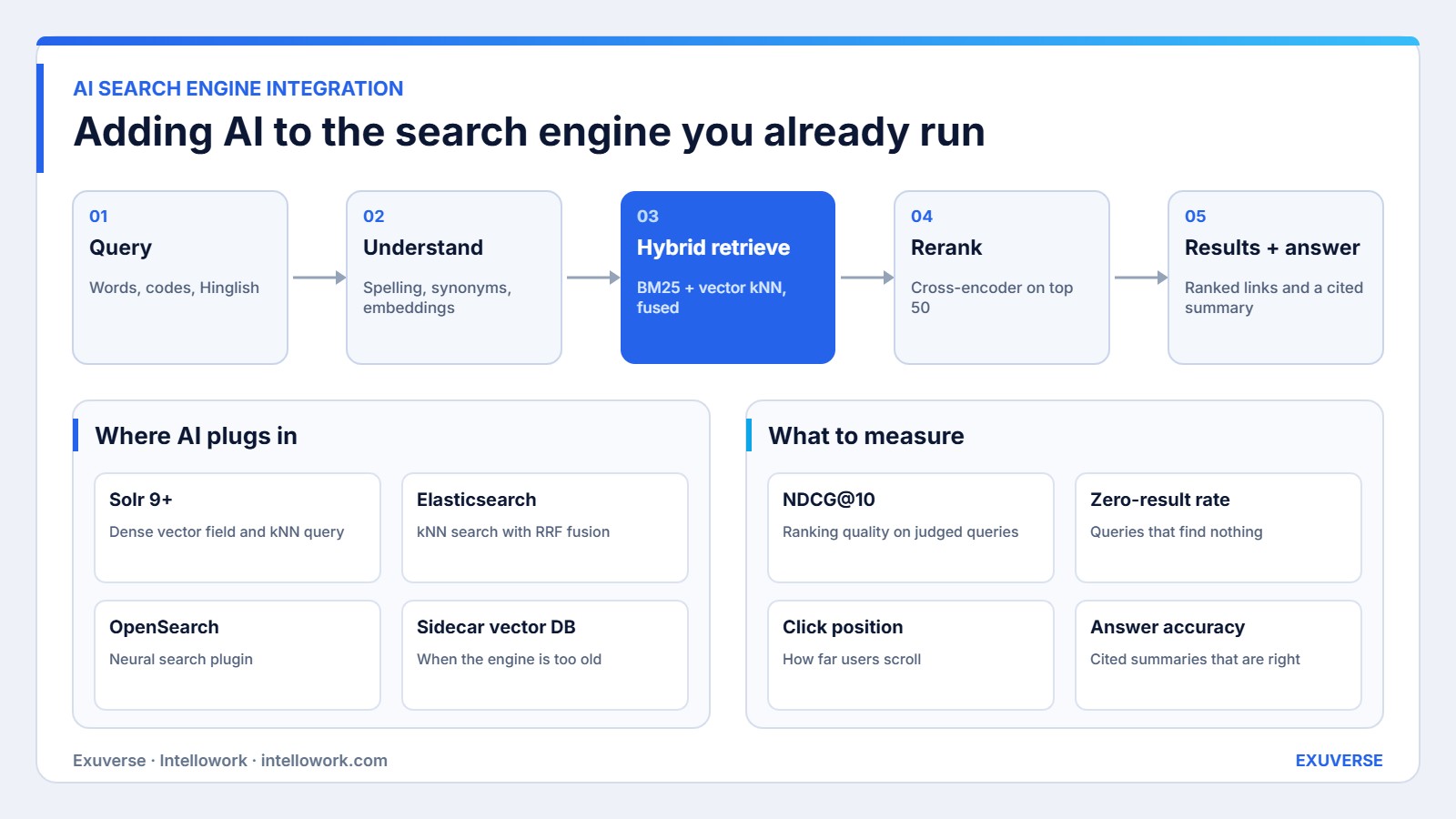
The diagram above shows a five-step pipeline. Importantly, each step can be added on its own, so you can roll out gradually.
1. Query understanding
First, the system cleans the query. It fixes spelling, expands synonyms and abbreviations, and detects intent, such as “looking for a document” versus “looking for a person”. It also converts the query into an embedding, which is a list of numbers that represents its meaning.
2. Hybrid retrieval
Next, the engine runs two searches at once. A BM25 keyword search returns exact matches, while a k-nearest-neighbour (kNN) vector search returns passages with similar meaning. The two result lists are merged, often with reciprocal rank fusion. Elastic’s hybrid search overview explains the method well, and our own hybrid search architecture guide covers design choices.
3. Reranking
Then a reranker reads the top 50 or so results together with the query and reorders them. Cross-encoder rerankers are slower than retrieval, so they only look at a short list. That trade-off gives a large relevance gain for a small latency cost.
4. Answer generation
Optionally, a language model reads the top passages and writes a two or three sentence answer with citations. Meanwhile, users still see the ranked results underneath. This is retrieval augmented generation applied to search, and we describe it in RAG with Solr and Elasticsearch.
5. Feedback and tuning
Finally, clicks, dwell time and thumbs up or down feed back into ranking. Over time, learning to rank models learn which results satisfy users for each type of query.
AI search engine integration example: a retailer’s site search
For example, an Indian electronics retailer runs Solr 8 for its catalogue of 120,000 products. Shoppers type queries like “phone with good camera under 20k” and get poor results, because no product title contains those words.
- Upgrade and embed. The team upgrades to Solr 9, which supports dense vector fields. Each product’s title, key specs and top review lines are embedded and stored alongside the existing fields.
- Parse the query. Query understanding extracts “under 20k” as a price filter of ₹20,000 and keeps “good camera” for semantic matching.
- Retrieve both ways. Keyword search still catches brand and model names. Meanwhile, vector search matches “good camera” to products whose specs and reviews praise low-light photos.
- Rerank. A reranker orders the top 50 by how well each product fits the whole query, not just parts of it.
- Keep the facets. Existing brand, RAM and price facets work exactly as before, so merchandising rules stay intact.
In short, the retailer did not replace its platform. Instead, it added three components around Solr, and each could be switched off if results dipped.
AI search engine integration options by platform
| Engine | Native AI support | Integration route | Good fit when |
|---|---|---|---|
| Apache Solr 9+ | Dense vector fields, kNN queries | Add vector fields and a hybrid query parser | You already run Solr and want to keep it |
| Elasticsearch 8+ | kNN search, RRF, semantic reranking | Add dense_vector mappings and a hybrid query | You want managed features and strong tooling |
| OpenSearch 2+ | Neural search plugin, hybrid queries | Configure ingest pipelines with embedding models | You prefer open source on AWS |
| Older Solr or Elasticsearch | None | Sidecar vector database, fused results in the app layer | An upgrade is not possible yet |
If you are weighing a platform change as well, our Solr to Elasticsearch migration guide covers when it is worth it.
AI search engine integration vs the alternatives
| Approach | Strength | Weakness |
|---|---|---|
| Keyword search only | Fast, precise on exact terms | Misses meaning and natural phrasing |
| Vector search only | Understands meaning | Weak on codes, names and rare words |
| Hybrid search with reranking | Best of both, measurable gains | More components to monitor |
| Replace with a SaaS AI search tool | Quick to launch | Migration, lock-in and loss of custom logic |
Integrated search across many sources
Many teams searching for “integrated search” want one search box across several systems: documents in SharePoint, tickets in Jira, customer records in CRM and pages on the intranet. AI search engine integration makes this far more practical than before.
In fact, the reason is ranking. In the past, merging results from different sources produced a messy list, because each source scored relevance differently. With embeddings and a reranker, every result is scored against the same question in the same way. As a result, a ticket, a policy and a wiki page can sit in one sensible order.
In practice, integrated search needs three things. First, connectors that index each source with its metadata and permissions. Second, a shared schema for common fields such as title, owner, date and source type. Third, a reranker that sees the query and every candidate together. Our guide to enterprise search software in India compares platforms that offer this out of the box.
Security and permissions in AI search
Of course, search engines have filtered results by access rights for years. However, AI features add new paths where restricted content can slip through, so each one needs the same protection.
- Vector results. Apply document-level security filters to kNN queries, not only to keyword queries. Otherwise, a semantic match can surface a file the user cannot open.
- Generated answers. Only pass permitted passages to the language model. A summary built from restricted text is still a leak, even if the link is hidden.
- Query logs. Queries often contain names and personal details. Therefore, set a retention period and mask personal data in analytics, in line with the DPDP Act.
Pros and cons of AI search engine integration
| Pros | Cons |
|---|---|
| Keeps existing infrastructure, filters and security | Embeddings add storage and indexing time |
| Can be rolled out step by step and switched off | Rerankers add latency that must be budgeted |
| Handles natural language and mixed languages | Needs judged queries to prove improvement |
| Enables cited answers on top of results | Older engine versions may need an upgrade first |
A phased AI search engine integration plan
Because each component is independent, you can release value every few weeks instead of waiting for a big launch.
- Weeks 1–2: baseline. Collect 200 to 500 real queries, judge the top results, and record current NDCG, zero-result rate and latency.
- Weeks 3–5: hybrid retrieval. Add embeddings and a hybrid query behind a feature flag. Then compare offline metrics before showing it to anyone.
- Weeks 6–8: reranking and A/B test. Add a reranker for the top results and run a live A/B test on a share of traffic.
- Weeks 9–12: answers and feedback. Add cited summaries for question-style queries, and start collecting feedback for learning to rank.
Moreover, at every step, the previous version stays one switch away. Consequently, the risk of AI search engine integration stays low even on a busy production site.
How we measure success
Above all, relevance must be measured, not eyeballed. Before any change, we build a judged set of real queries with graded results. Then we track the same framework on every release.
- Offline relevance. NDCG@10 and recall@50 on the judged set. This tells you whether ranking improved before users see it.
- Zero-result and reformulation rates. Fewer empty searches and fewer rewritten queries mean users find things faster.
- Engagement. Click-through rate and the average position of the first click. A first click moving up the page is a strong signal.
- Latency. The p95 response time, so AI features never make search feel slow.
- Answer quality. Where summaries are shown, accuracy and citation correctness on a fixed test set.
Our AI-driven relevance tuning article shows how we run these tests in practice.
Common AI search engine integration mistakes
To begin with, teams switch fully to vector search and lose exact-match accuracy. Next, they embed whole documents rather than passages, which blurs meaning. They also forget that access control lists must apply to vector results too. In addition, many skip the judged query set, so they cannot tell whether AI helped. Finally, some add a reranker without a latency budget and slow every search.
How Exuverse helps with AI search engine integration
Our search relevance engineering team integrates AI into Solr, Elasticsearch and OpenSearch without a rebuild. We also offer dedicated Apache Solr consulting and Elasticsearch consulting. For internal documents, Intellowork adds a permission-aware AI search and chat layer across SharePoint, Drive and Confluence.
Want to know what AI would change in your search? Share a sample of your queries and we will run a relevance baseline with you.
Frequently asked questions
What is AI search engine integration?
It is the process of adding AI features such as semantic understanding, vector retrieval, reranking and generated answers to an existing search engine like Solr, Elasticsearch or OpenSearch, without replacing it.
Can I add AI to Solr without migrating?
Yes. Solr 9 and later support dense vector fields and kNN queries, so you can run hybrid search inside Solr. Older versions can use a sidecar vector database with results merged in the application.
What is hybrid search?
Hybrid search runs keyword and vector searches together and merges the results. It keeps exact-match precision for codes and names while adding the ability to match meaning and natural phrasing.
Does AI search slow down results?
It can, mainly because of reranking and answer generation. Limiting reranking to the top 50 results, caching embeddings and streaming answers keep response times within a set latency budget.
What does “integrated search” mean?
Integrated search usually means one search box that covers several sources, such as documents, tickets and product data. AI makes it more useful by understanding the question and ranking results across all those sources.
How do I know if AI improved my search?
Build a set of real queries with graded results, measure NDCG@10 before and after, and watch zero-result rate, click position and latency in production. Improvement should show in both offline and live metrics.