AI in enterprise software has moved from a demo feature to a core part of how ERP, CRM, HRMS and support tools work. It reads invoices, drafts replies, answers policy questions and routes tickets. Increasingly, it also carries out multi-step tasks under human approval.
Last updated: 30 September 2026
Yet many companies still struggle to turn AI features into measurable value. This guide explains where AI fits inside enterprise software, how it works technically, and how to adopt it without creating new risks. It draws on the enterprise systems we build and modernise at Exuverse.
What does AI in enterprise software mean?
AI in enterprise software means using machine learning and language models inside business applications to understand content, predict outcomes and act on behalf of users. It is different from a standalone chatbot, because it works inside the workflow and with the application’s own data and permissions.
For example, a finance user no longer types invoice lines by hand. Instead, the ERP extracts them from a PDF, matches them to a purchase order and flags only the mismatches. The user stays in the same screen, and the AI simply removes the tedious part.
The four levels of AI in enterprise software
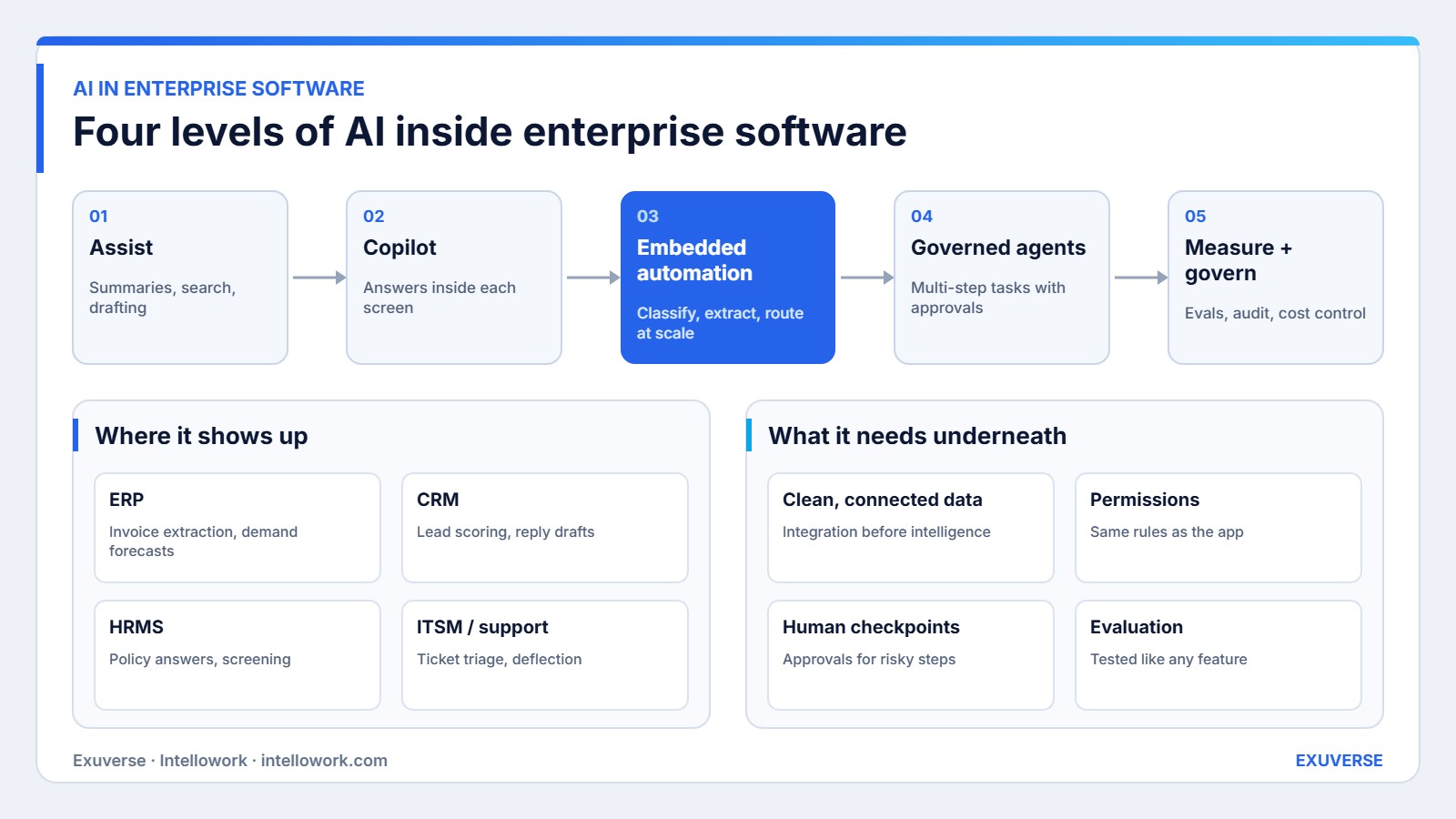
The diagram above shows four levels. Most organisations move through them in order, because each level depends on the foundations of the one before.
Level 1: assist
First, AI summarises long records, improves search and drafts text. In other words, the user decides everything. Because this level is low risk, it is usually the first to ship.
Level 2: copilot
Next, a copilot answers questions about the data on screen, such as “Why did this customer’s margin drop?” Also, it uses retrieval over records and documents, and it cites what it used. We explain the retrieval side in our guide to knowledge base chatbots.
Level 3: embedded automation
Then, at this level, AI runs in the background at scale. It classifies tickets, extracts fields from documents, scores leads and predicts demand. Meanwhile, people review exceptions rather than every item. As a result, throughput rises without adding headcount.
Level 4: governed agents
Finally, agents plan and complete multi-step tasks, such as “Reconcile last month’s vendor statements and draft queries for mismatches”. To do this, they call application APIs as tools, and they pause for approval before risky steps. Our article on AI agents covers how they differ from chatbots.
How AI in enterprise software actually works
In practice, AI features in enterprise applications share one architecture under the hood. Understanding it helps you judge vendors and plan your own builds.
- Data access. The AI layer reads records through the application’s APIs or a synced data store, and documents through a search index. This is why enterprise AI integration comes first.
- Context building. For each request, the system gathers the relevant records and passages, filtered by the user’s role. It then sends only that context to the model.
- Model call. A language model or a specialised model (for example, an OCR or forecasting model) produces an answer, a classification or a plan.
- Action layer. If the output is an action, it goes through the same business rules and validations as a human action. Therefore, an AI cannot post an invoice that a clerk could not post.
- Logging and evaluation. Every request, context and output is logged, so quality and cost can be measured and audited.
A practical example: accounts payable in a mid-sized manufacturer
For example, a manufacturer in Noida receives about 4,000 supplier invoices a month as PDFs and emails. Until now, three clerks keyed them into the ERP and chased mismatches.
- Extraction. AI reads each invoice and extracts the supplier, GSTIN, line items, tax and totals. It also gives a confidence score for each field.
- Matching. The system matches the invoice to the purchase order and goods receipt. Clean three-way matches go straight to approval.
- Exceptions. Low-confidence fields and price differences go to a clerk’s queue, with the reason already written.
- Agent step. For recurring mismatches, an agent drafts an email to the supplier. However, a clerk approves each email before it is sent.
As a result, the clerks now spend their time on judgement calls, not typing. Meanwhile, every AI decision remains visible in the ERP’s audit trail.
AI in enterprise software by application type
| Application | High-value AI uses | Data it needs |
|---|---|---|
| ERP | Invoice extraction, demand forecasting, anomaly detection | Transactions, master data, documents |
| CRM | Lead scoring, reply drafting, call summaries | Contacts, activities, emails, call notes |
| HRMS | Policy Q&A, resume screening support, onboarding help | Policies, job data, employee records |
| ITSM and support | Ticket triage, deflection, root-cause hints | Tickets, knowledge articles, logs |
| Custom line-of-business apps | Domain-specific copilots and automation | Whatever the app owns |
Built-in vendor AI vs custom AI vs a platform
| Option | Strength | Limit | Best when |
|---|---|---|---|
| Vendor AI features | Ready inside the tool, no build | Sees only that vendor’s data | The workflow lives in one application |
| Custom AI built into your apps | Fits your process and data exactly | Needs engineering and upkeep | The process is a competitive edge |
| Cross-application AI platform | Works across many systems at once | Needs integration and governance | Questions span several tools |
In fact, most enterprises end up with all three. The key is a shared data and governance layer, so each new AI feature does not create a new silo.
Pros and cons of AI in enterprise software
| Pros | Cons |
|---|---|
| Removes repetitive data entry and lookup work | Poor data quality leads to confident wrong outputs |
| Works inside existing screens, so adoption is easier | Vendor features can lock insight inside one tool |
| Scales review work through exception queues | Needs evaluation and monitoring like any feature |
| Enables new services, such as 24×7 answers | Model and usage costs must be controlled |
Risks and governance for AI in enterprise software
Above all, AI features inherit the risks of the data they touch. Consequently, governance should be built into the product, not added as a policy document later. The NIST AI Risk Management Framework is a useful reference, and in India the DPDP Act adds duties around personal data.
- Permissions. AI must follow the application’s existing roles. If a user cannot see a record, the AI cannot use it for that user.
- Human checkpoints. Actions with money, legal or customer impact need approval until accuracy is proven.
- Explainability. Outputs should show their sources or reasons, so users can check them quickly.
- Security. Prompt injection and data leakage are real threats. Our guide to enterprise AI security risks lists the controls we use.
Where AI in enterprise software is heading
Moreover, several shifts are already visible in the products and projects we work on. Together, they change how enterprise software is designed, not just what features it has.
- From features to agents. Vendors are moving from single AI buttons to agents that complete whole tasks. Consequently, approval flows and audit trails are becoming product features in their own right.
- Open tool protocols. Standards such as the Model Context Protocol let one assistant use tools across many applications. As a result, cross-system AI no longer needs a custom connector for every pair of tools.
- Smaller, cheaper models for routine work. Classification and extraction increasingly run on small models, while large models handle reasoning. This keeps cost per task under control.
- Sovereign and in-region AI. Regulated Indian firms are asking for models and data that stay in India. Therefore, hosting choices now shape which AI features you can switch on.
- Evaluation as a discipline. Teams now test AI features with fixed datasets before every release, just as they run regression tests on code.
What drives the cost of AI in enterprise software
Costs vary widely, so it is more useful to know the drivers than to guess a single figure. Firstly, data work is usually the largest item: connecting sources, cleaning fields and mapping permissions. Secondly, integration with the application’s screens and APIs takes real engineering, especially in older systems. Thirdly, model usage creates a running cost that grows with volume, which is why routing simple tasks to smaller models matters. Finally, evaluation, monitoring and support continue after launch. Budgeting for all four avoids the common surprise of a cheap pilot followed by an expensive rollout.
How to adopt AI in enterprise software step by step
- Pick one painful workflow. Choose work that is frequent, rule-based and currently manual, such as invoice entry or ticket routing.
- Fix the data it needs. Connect the sources, clean key fields and confirm permissions.
- Ship assist or copilot first. Let users see AI suggestions before AI acts on its own.
- Measure, then automate. Once accuracy is proven on a test set, move to exception-only review.
- Reuse the foundation. Finally, use the same data, governance and evaluation layer for the next workflow.
How we measure success
We set targets with each client after a baseline, rather than quoting numbers in advance. The framework covers four areas.
- Quality. Accuracy on a fixed test set, and the share of outputs users accept without edits.
- Efficiency. Time per task, items handled per person, and the share of work handled as exceptions only.
- Adoption. Weekly active users of each AI feature and repeat usage by team.
- Risk and cost. Permission test results, incidents, and model cost per completed task.
How Exuverse builds AI into enterprise software
Exuverse is an AI and custom software development company in Noida. We add AI to existing ERP, CRM and in-house systems, and we build new SaaS products with AI designed in from the start. Our AI development team handles data integration, models, agents and governance. For knowledge-heavy work, Intellowork adds a secure AI assistant across your documents.
Planning AI for your business systems? Talk to our team and we will help you pick the first workflow worth automating.
Frequently asked questions
What is AI in enterprise software?
It is the use of machine learning and language models inside business applications such as ERP, CRM and HRMS to understand documents, answer questions, predict outcomes and carry out tasks within the application’s rules and permissions.
What are common examples of AI in enterprise software?
Invoice extraction and matching in ERP, lead scoring and email drafting in CRM, policy answers in HRMS, and ticket triage and deflection in IT service management tools.
Is AI in enterprise software safe for sensitive data?
It can be, if AI follows the application’s existing roles, keeps data in approved regions, logs every request and requires human approval for risky actions. Safety comes from design, not from the model alone.
Should we use vendor AI features or build our own?
Use vendor features when the workflow lives inside one tool. Build custom AI when the process is unique to your business or spans several systems. Many companies combine both on a shared data layer.
What is the difference between a copilot and an AI agent?
A copilot answers and suggests while the user decides. An agent plans and completes multi-step tasks by calling application APIs, usually pausing for approval before important actions.
How long does it take to add AI to an existing system?
A focused assist or copilot feature on one workflow usually takes six to ten weeks, including data work and testing. Automation and agents follow once accuracy has been proven.