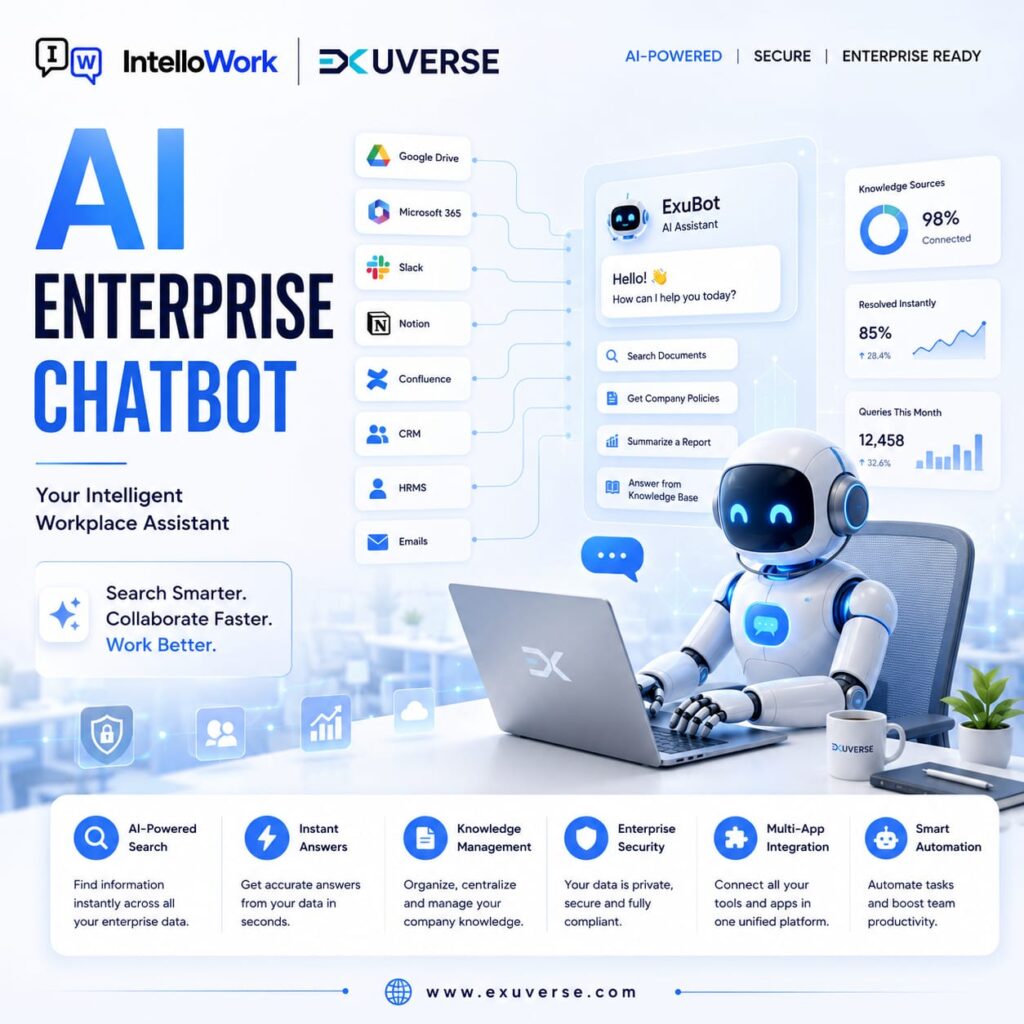
An AI Chatbot helps businesses automate customer support, improve employee productivity, and provide instant answers through natural-language conversations. Unlike traditional rule-based chatbots, modern AI chatbots can understand user intent, retrieve relevant information, and generate context-aware responses.
For example, a customer may ask:
“Which plan is suitable for a growing business?”
An employee may ask:
“How do I request access to the company VPN?”
A support agent may ask:
“What is the recommended solution for this product issue?”
An AI Chatbot can help users find relevant information without requiring them to search through multiple pages, documents, or systems.
However, successful AI chatbot implementation requires more than adding a chat window to a website.
Businesses need to consider:
- The purpose of the chatbot
- Knowledge sources
- AI capabilities
- Response quality
- Security and privacy
- User access
- System integrations
- Monitoring and improvement
This guide explains what an AI Chatbot is, how it works, its business benefits, common use cases, important features, implementation steps, and how Intellowork, developed by Exuverse, helps organizations build AI-powered knowledge experiences.
What Is an AI Chatbot?
An AI Chatbot is a software application that uses artificial intelligence to understand user questions and provide relevant responses through a conversational interface.
Modern AI chatbots may use technologies such as:
- Natural language processing
- Machine learning
- Large language models
- Semantic search
- Retrieval systems
- Generative AI
Users can interact with an AI Chatbot using natural language.
Instead of selecting options from a fixed menu, a user can ask:
“How can I reset my account password?”
The chatbot can interpret the request and provide relevant guidance.
An AI Chatbot may be used on:
- Websites
- Mobile applications
- Customer portals
- Employee portals
- Internal business platforms
- Messaging channels
- Support systems
The exact functionality depends on the chatbot’s purpose and connected data.
How Does an AI Chatbot Work?
An AI Chatbot generally follows several steps.
1. The User Asks a Question
The user enters a question in natural language.
Example:
“What is the process for requesting annual leave?”
2. The Chatbot Understands the Question
The AI system analyzes:
- User intent
- Important terms
- Context
- Possible meaning
It may understand that “requesting annual leave” is related to an employee leave process.
3. The System Retrieves Relevant Information
If the chatbot is connected to organizational knowledge, it may search:
- Internal documents
- Knowledge bases
- Policies
- Product information
- Support articles
- Business systems
4. The AI Generates a Response
The AI model uses the relevant information to create a clear answer.
5. The User Receives the Answer
The chatbot presents the response and may provide:
- Source references
- Relevant links
- Suggested next steps
- Follow-up options
6. The System Learns From Feedback
Organizations may use feedback to identify:
- Poor answers
- Missing information
- Knowledge gaps
- Common questions
- Areas for improvement
AI Chatbot vs Traditional Chatbot
Traditional chatbots usually follow predefined rules.
They may use:
- Buttons
- Menus
- Decision trees
- Keyword triggers
- Fixed responses
AI chatbots can understand broader natural-language questions.
| Traditional Chatbot | AI Chatbot |
|---|---|
| Uses fixed conversation flows | Supports flexible conversations |
| Depends on predefined rules | Uses AI to understand questions |
| Provides scripted responses | Can generate contextual responses |
| Limited to expected inputs | Handles varied question phrasing |
| Requires manual flow updates | Can use connected knowledge |
| Best for predictable tasks | Useful for complex information discovery |
Traditional chatbots are still useful for structured workflows.
For example, a chatbot that collects appointment details may work well with fixed questions.
An AI Chatbot is more useful when users ask many different questions and need context-aware answers.
AI Chatbot vs Generative AI Assistant
The terms are sometimes used interchangeably, but they can describe different capabilities.
An AI Chatbot may focus on:
- Answering questions
- Providing support
- Guiding users
- Retrieving information
A generative AI assistant may also:
- Draft content
- Summarize documents
- Analyze information
- Generate ideas
- Support complex tasks
Many modern business systems combine chatbot and generative AI capabilities.
Why Businesses Need an AI Chatbot
Businesses receive a large number of repeated questions.
Customers ask about:
- Products
- Pricing
- Features
- Orders
- Support
Employees ask about:
- HR policies
- IT access
- Internal processes
- Company information
Support teams search for:
- Troubleshooting steps
- Product documentation
- Standard responses
An AI Chatbot can provide a scalable self-service layer.
Faster Responses
Users can receive information without waiting for a team member.
Reduced Repetitive Work
Teams can spend less time answering common questions.
Better Customer Experience
Customers can access support information at any time.
Improved Employee Productivity
Employees can find internal knowledge more quickly.
Consistent Information
A centralized knowledge source can reduce reliance on informal answers.
Scalable Support
The chatbot can support multiple users simultaneously.
Common AI Chatbot Use Cases
1. Customer Support AI Chatbot
A customer support chatbot can help users:
- Find product information
- Understand features
- Resolve common issues
- Access support resources
- Identify the next step
The chatbot can handle common questions and route complex issues to human agents.
2. Website AI Chatbot
A website can help visitors:
- Discover services
- Understand products
- Find relevant pages
- Request a demo
- Contact the business
The chatbot can improve website navigation and engagement.
3. Employee Knowledge Chatbot
Employees can ask questions about:
- HR policies
- Company processes
- IT procedures
- Internal documentation
- Employee benefits
This can reduce knowledge silos.
4. IT Support Chatbot
An IT chatbot can provide guidance on:
- Password resets
- Software access
- Device setup
- Security policies
- Technical troubleshooting
5. HR Chatbot
An HR chatbot can help employees find information about:
- Leave policies
- Attendance
- Benefits
- Onboarding
- Workplace policies
6. Sales AI Chatbot
Sales teams can use AI to find:
- Product details
- Sales materials
- Customer case studies
- Competitive information
- Objection-handling guidance
7. Internal Enterprise AI Chatbot
An enterprise can connect approved organizational knowledge and help employees search for information using natural language.
Key AI Chatbot Features
Businesses should evaluate features based on their use case.
Natural-Language Understanding
The chatbot should understand different ways users express the same question.
Knowledge Search
The system should retrieve relevant information from approved sources.
Context-Aware Responses
The chatbot should consider conversation context where appropriate.
Source References
Providing source links can help users verify answers.
Multi-Language Support
Organizations with diverse users may need multiple languages.
Human Handoff
Complex requests may need escalation to a human.
Analytics
Analytics can help organizations understand:
- Popular questions
- Unanswered queries
- User satisfaction
- Knowledge gaps
Integrations
The chatbot may need to connect with:
- CRM systems
- Knowledge bases
- Help-desk platforms
- Internal applications
Access Controls
Users should only access information they are authorized to view.
AI Chatbot for Customer Support
Customer support is one of the most common use cases.
A chatbot can help answer questions about:
- Products
- Services
- Account access
- Common issues
- Documentation
However, businesses should avoid using an as a complete replacement for human support.
Some issues require:
- Human judgment
- Empathy
- Complex investigation
- Account-specific decisions
A strong approach combines AI self-service with human support.
AI Chatbot for Employees
Employees often spend time searching through:
- Shared folders
- Internal portals
- Policy documents
- Knowledge bases
- Emails
An internal AI Chatbot can provide a conversational way to access approved company knowledge.
Employees can ask:
“Where can I find the latest travel policy?”
“How do I request access to a business application?”
“What is the onboarding process for a new team member?”
This can improve knowledge accessibility and reduce repeated internal questions.
AI Chatbot for Enterprise Knowledge
Enterprise knowledge is often distributed across departments.
An AI Chatbot can help connect employees with relevant information.
However, enterprise implementation should include:
- Knowledge governance
- Content ownership
- Access permissions
- Security controls
- Evaluation processes
A chatbot is only as reliable as the information and systems supporting it.
What Is RAG in an AI Chatbot?
RAG stands for Retrieval-Augmented Generation.
RAG combines:
- Information retrieval
- AI-generated responses
When a user asks a question, the system retrieves relevant information before generating an answer.
The workflow is:
User Question → Knowledge Search → Relevant Content → AI Response
For example:
Question:
“What is the company’s remote-work policy?”
Process:
- Search the approved policy documents
- Retrieve relevant content
- Use the content as context
- Generate a clear answer
RAG can help ground answers in organizational knowledge.
However, organizations should still evaluate response quality and monitor the system.
Benefits of an AI Chatbot for Businesses
1. 24/7 Information Access
Users can access information outside normal business hours.
2. Faster Response Times
The chatbot can provide immediate guidance for common questions.
3. Lower Repetitive Support Work
Teams can focus on more complex issues.
4. Better Employee Self-Service
Employees can find information independently.
5. Improved Knowledge Discovery
Natural-language questions can make information easier to access.
6. Consistent Support
The chatbot can use approved knowledge sources.
7. Scalable User Assistance
One system can support many users simultaneously.
AI Chatbot Security and Privacy
Security is essential when a chatbot uses business information.
Organizations should evaluate:
- Authentication
- Role-based access
- Data permissions
- Encryption
- Audit logs
- Data retention
- Vendor security
- Administrative controls
An internal should not provide information that a user is not authorized to access.
Security requirements should be defined before deployment.
How to Build an AI Chatbot
Step 1: Define the Goal
Identify the primary business problem.
Examples:
- Reduce customer support queries
- Improve employee knowledge access
- Help website visitors
- Support employee onboarding
Step 2: Identify Users
Define who will use the chatbot.
Examples:
- Customers
- Employees
- Partners
- Support agents
Step 3: Select Knowledge Sources
Identify approved information sources.
Examples:
- FAQs
- Product documentation
- Internal policies
- Knowledge bases
Step 4: Review Content Quality
Check for:
- Outdated information
- Duplicate documents
- Missing content
- Conflicting guidance
Step 5: Define Security Requirements
Determine:
- Who can access the chatbot
- Which information each user can access
- How activity is monitored
Step 6: Build a Pilot
Start with one use case.
Step 7: Test Responses
Evaluate:
- Accuracy
- Relevance
- Completeness
- Safety
- User satisfaction
Step 8: Collect Feedback
Allow users to rate responses.
Step 9: Improve the Knowledge Base
Update content and address gaps.
Step 10: Scale Gradually
Add more users and knowledge sources after successful testing.
Common AI Chatbot Implementation Mistakes
Connecting Poor-Quality Content
Outdated content can produce outdated answers.
Ignoring Access Permissions
Weak permissions can create security risks.
Launching Without Testing
AI responses should be evaluated before broad deployment.
Expecting Perfect Answers
AI systems can make mistakes.
Organizations should provide clear escalation paths.
Ignoring User Feedback
Feedback helps identify gaps.
Using AI Without Knowledge Governance
Content ownership and updates remain important.
How to Measure AI Chatbot Success
Track metrics such as:
- Number of conversations
- Active users
- Answer satisfaction
- Resolution rate
- Unanswered questions
- Escalation rate
- Average response time
- Support workload reduction
- User feedback
Metrics should align with business goals.
AI Chatbot ROI: What Businesses Should Measure
ROI should not be measured only by cost savings.
Organizations can also evaluate:
- Time saved
- Faster support
- Improved employee productivity
- Better customer experience
- Reduced search effort
- Faster onboarding
A successful chatbot should improve a meaningful business outcome.
How Intellowork Helps Businesses Build an AI-Powered Knowledge Experience
Intellowork, developed by Exuverse, helps organizations make internal knowledge easier to discover through AI-powered search and conversational interaction.
Instead of requiring employees to search across disconnected documents and systems, Intellowork helps users ask questions in natural language and discover relevant information from approved organizational knowledge.
Intellowork can help organizations:
- Centralize enterprise knowledge discovery
- Improve internal information search
- Reduce knowledge silos
- Support employee self-service
- Make internal documents easier to access
- Improve onboarding
- Reduce repetitive internal questions
- Build an AI-powered knowledge experience
The effectiveness of an enterprise AI chatbot depends on the quality, governance, and accessibility of connected knowledge.
Intellowork supports a structured approach to making enterprise knowledge more useful.
AI Chatbot Implementation Checklist
Before launch, confirm:
- ☐ Business objective is defined
- ☐ Target users are identified
- ☐ Knowledge sources are approved
- ☐ Content is reviewed
- ☐ Access controls are configured
- ☐ Security requirements are documented
- ☐ Pilot use case is selected
- ☐ Test questions are prepared
- ☐ Responses are evaluated
- ☐ Human escalation is available
- ☐ Feedback is collected
- ☐ Success metrics are defined
Frequently Asked Questions
What is an AI Chatbot?
An Chatbot is a conversational software system that uses artificial intelligence to understand user questions and provide relevant responses.
How does an AI Chatbot work?
An AI Chatbot interprets a user’s question, retrieves relevant information when connected to a knowledge source, and generates a response.
What is the difference between an AI Chatbot and a traditional ?
Traditional chatbots generally follow predefined rules. AI chatbots can understand natural language and support more flexible conversations.
Can an AI Chatbot use company documents?
Yes. An enterprise t can use approved internal knowledge sources, subject to appropriate access controls and security requirements.
What is RAG in an AI Chatbot?
RAG means Retrieval-Augmented Generation. It retrieves relevant information before the AI generates a response.
Can an AI Chatbot replace human support?
AI chatbots can automate common questions, but complex, sensitive, or high-impact issues may still require human support.
Is an AI Chatbot secure?
Security depends on implementation. Businesses should evaluate authentication, permissions, encryption, logging, data governance, and vendor security.
How does Intellowork help?
Intellowork helps organizations create an AI-powered enterprise knowledge experience that makes approved internal information easier to search and discover.
Final Thoughts
An AI Chatbot can help businesses provide faster answers, improve customer service, support employees, and reduce repetitive work.
However, successful implementation requires more than selecting an AI model.
Organizations should focus on:
- Clear business goals
- Reliable knowledge sources
- Strong security
- Accurate retrieval
- Continuous testing
- User feedback
With the right strategy, an AI Chatbot can become a valuable knowledge and support layer for customers and employees.
Transform Business Knowledge Into Instant Answers With Intellowork
Intellowork, developed by Exuverse, helps organizations make internal knowledge easier to search, discover, and use through an AI-powered enterprise knowledge experience.
Reduce knowledge silos, improve employee self-service, and help teams find relevant information through natural-language interaction.
Explore Intellowork and discover how an AI-powered knowledge experience can support your business.